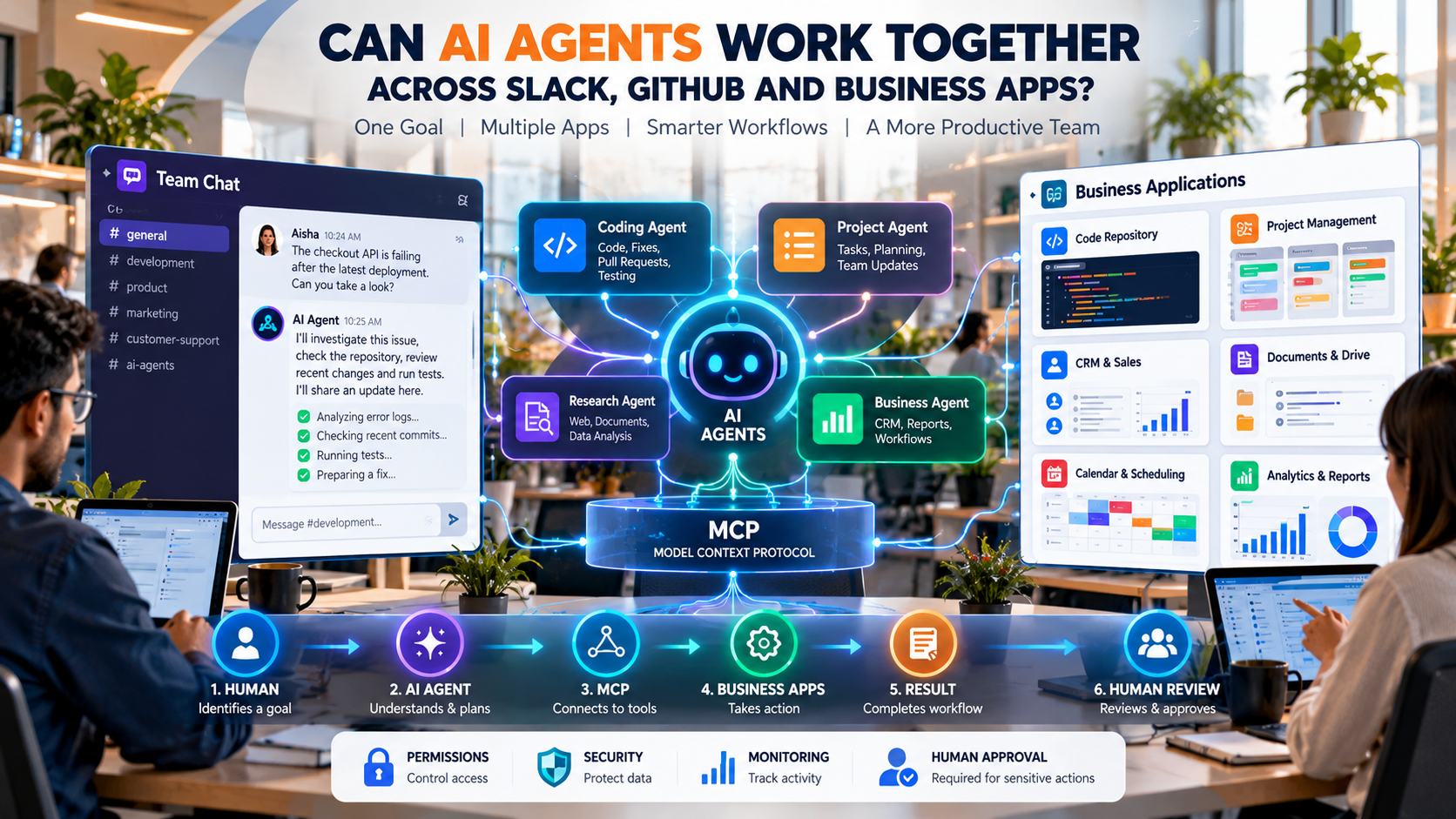
AI agents are moving beyond simple chatbots. Instead of only answering questions, modern AI agents can use tools, access business information, and complete multiple steps. Platforms such as Slack and GitHub are already adding agent-based workflows that connect conversations with coding and business tasks. This raises an important question: Can AI agents work together across Slack, GitHub, CRM systems, documents, and other business applications? The GitHub Blog
1. What Are AI Agents?
AI agents are software systems that can understand a goal, plan steps, use connected tools, and perform actions with less step-by-step instruction from a human.
A normal AI chatbot usually works like this:
User asks → AI answers
An AI agent can work more like this:
User gives a goal → AI understands → AI plans → AI uses tools → AI completes tasks → AI reports the result
For example, instead of asking an AI to explain a GitHub bug, a developer could ask an agent to investigate the bug, check the repository, review relevant code, make a change, run tests, and prepare a pull request.
This is why AI agents are becoming important for software development and enterprise automation.
2. Why Do AI Agents Need Multiple Business Apps?
Modern companies rarely use only one application.
A software company might use:
- Slack for communication
- GitHub for code and pull requests
- Jira or Linear for project management
- Google Drive or Notion for documents
- Salesforce for customer information
- Email and Calendar for communication and scheduling
- Databases for business data
The information needed to complete one task can therefore be spread across several applications.
Imagine a developer reports a production problem in Slack. The actual problem may be connected to a GitHub issue, a recent pull request, a project task, and a customer complaint.
An AI agent that can securely access these systems could potentially bring the relevant information together instead of making the employee search through every application manually.
Slack is already building this type of connected agent experience, allowing AI systems to access Slack context and connect with external tools through MCP. Slack
3. How Can AI Agents Connect Slack and GitHub?
One practical example is the integration between Slack and GitHub Copilot.
GitHub introduced a Copilot experience inside Slack that allows users to mention @GitHub in conversations. Copilot can use permitted GitHub context to answer code questions, investigate problems, update or create issues, implement changes, validate work, and open pull requests. The GitHub Blog
A simple workflow could look like this:
Slack
A developer reports:
“The checkout API started failing after the latest deployment.”
↓
AI Agent
Understands the conversation and identifies the likely project.
↓
GitHub
Checks issues, recent changes, commits, and relevant code.
↓
Coding Agent
Investigates the problem and proposes or implements a fix.
↓
Testing
The agent validates the changes.
↓
Pull Request
A pull request is created for developers to review.
↓
Slack
The team receives the result.
This is a good example of how AI can move from answering questions to completing workflows. GitHub says its Slack integration can continue working asynchronously while users are doing other tasks, while existing GitHub permissions and controls remain in effect. The GitHub Blog
4. What Is MCP and Why Is It Important for AI Agents?
One of the important technologies behind connected AI tools is Model Context Protocol (MCP).
In simple terms, MCP provides a standardized way for AI applications to connect with external tools and data.
Think of it like a common connection layer:
AI Agent
↓
MCP
↓
Slack | GitHub | CRM | Documents | Databases | Project Tools
Without a standard approach, developers may need to create separate integrations for every AI system and every application.
MCP aims to make these connections more consistent.
Slack describes MCP as an open standard that allows AI agents to connect with external tools and data. Its MCP server can provide agents with access to permitted Slack information and actions, while Slackbot can also connect to applications that provide MCP servers. Slack
This makes MCP an important part of the growing AI agent ecosystem.
5. Can Multiple AI Agents Work Together?
Yes, and this is where multi-agent AI becomes interesting.
Instead of creating one AI agent that does everything, companies can use multiple specialized agents.
For example:
Developer Agent
Handles:
- Code
- Bugs
- Pull requests
- Testing
Project Management Agent
Handles:
- Tasks
- Deadlines
- Project status
- Team updates
Sales Agent
Handles:
- Customer information
- Leads
- Sales activities
- Follow-ups
Research Agent
Handles:
- Research
- Documents
- Reports
- Data analysis
These agents can potentially work together.
For example:
Customer reports a problem
↓
Support Agent understands the issue.
↓
Project Agent creates a task.
↓
Developer Agent investigates GitHub.
↓
Testing Agent checks the fix.
↓
Project Agent updates the task.
↓
Communication Agent sends the result to Slack.
This type of workflow is called a multi-agent system, where different AI agents can specialize in different tasks.
Slack is increasingly positioning its platform around agent orchestration, including workflows where specialized agents can be routed through a common conversational interface. Slack
6. How Could AI Agents Automate Software Development?
Software development is one of the clearest examples of connected AI agents.
A future development workflow could look like:
Slack
↓
Bug reported by the team
↓
Project Management
↓
Task automatically created
↓
GitHub
↓
Repository and code investigated
↓
AI Coding Agent
↓
Code changes prepared
↓
Testing Agent
↓
Automated tests performed
↓
GitHub
↓
Pull request created
↓
Human Developer
↓
Reviews and approves the changes
The important point is that AI does not necessarily need to replace developers.
Instead, AI can handle repetitive steps while developers remain responsible for important decisions and code review.
GitHub’s current Slack integration already demonstrates part of this workflow by allowing Copilot to investigate issues, implement changes, validate its work, and open pull requests from Slack conversations. The GitHub Blog
7. How Could AI Agents Automate Business Workflows?
The same idea can work outside software development.
Imagine a sales manager asks:
“Prepare a report for tomorrow’s customer meeting.”
An enterprise AI system could potentially:
- Check the CRM.
- Find recent customer activity.
- Search Slack conversations.
- Find relevant documents.
- Review previous sales information.
- Create a summary.
- Prepare a presentation or report.
- Put the result back into the team’s workspace.
The goal is not simply to generate text.
The goal is to connect information and actions across business systems.
Slack’s current agentic platform supports connections between Slack and external applications through MCP, with examples involving systems such as Salesforce, Figma, Jira-related tools, document platforms, and other business applications. Slack
8. What Are the Benefits of Connected AI Agents?
Connected AI agents could provide several benefits.
Less Manual Work
Employees may spend less time copying information between applications.
Faster Workflows
An agent can potentially perform several connected steps without requiring a person to start each step manually.
Better Business Context
An AI system can use information from multiple approved sources instead of relying on a single application.
Fewer Repetitive Tasks
Tasks such as creating tickets, preparing summaries, checking statuses, and updating records can potentially be automated.
Better Team Collaboration
When AI work happens inside team conversations, people can see the task, provide feedback, and review the result.
Slack’s current code-channel experience, for example, allows teams to see agent work, inspect changes, provide feedback, and review output together. Slack
9. What Are the Security Risks of AI Agents?
The more applications an AI agent can access, the more important security becomes.
An agent that can only read information is different from an agent that can change information.
For example, an AI agent might be allowed to:
- Read Slack messages
- Search GitHub
- Create an issue
- Create a pull request
But an organization may not want that same agent to:
- Delete files
- Merge production code
- Change user permissions
- Send sensitive emails
- Modify financial records
- Deploy software automatically
This is why permissions, authentication, monitoring, audit logs, and human approval are important parts of enterprise AI.
Slack’s MCP architecture emphasizes existing permissions and enterprise security controls, and GitHub’s Slack integration keeps agent actions within GitHub permissions and can require additional approval before an agent-authored pull request is merged. Slack
10. Should AI Agents Have Full Access to Business Systems?
Not necessarily.
A safer approach is to give an AI agent only the access it needs.
For example:
Read-only access
→ Search documents and information.
Limited write access
→ Create tasks or drafts.
Approval-based access
→ Request permission before important actions.
Restricted production access
→ Require human approval before deployment or other high-impact changes.
This creates a human-in-the-loop AI workflow.
The AI can do much of the repetitive work, while people remain involved when an action could have significant consequences.
11. Will AI Agents Replace Slack, GitHub and Other Business Apps?
AI agents are more likely to work with existing applications than immediately replace them.
Slack can remain the communication platform.
GitHub can remain the software development platform.
CRM systems can remain the customer-data platform.
Project management tools can remain the planning platform.
The AI agent becomes the connection and automation layer between these systems.
A simple architecture could look like:
Human
↓
AI Agent / Agent Orchestrator
↓
MCP + APIs + Integrations
↓
Slack | GitHub | CRM | Documents | Databases | Project Management
This model could allow employees to interact with many systems through a simpler conversational interface.
12. What Is the Future of Connected AI Agents?
The development of AI is moving through several stages:
Chatbots
→ Answer questions.
AI Assistants
→ Help users complete individual tasks.
AI Agents
→ Plan and execute multi-step tasks.
Multi-Agent Systems
→ Multiple specialized agents work together.
Enterprise Agentic AI
→ Agents connect to business applications and coordinate workflows.
The biggest change is that AI is becoming more action-oriented.
Instead of asking:
“What should I do?”
Users may increasingly ask:
“Take care of this task and show me what you did.”
Current developments across Slack and GitHub show that this shift is already moving into real workplace software, although availability and capabilities vary by product, plan, permissions, and rollout. The GitHub Blog
13. Conclusion:
Yes, AI agents can increasingly connect with multiple business applications, but the exact capabilities depend on the integrations, APIs, permissions, and tools available.
Slack and GitHub already provide practical examples of this direction. MCP is also becoming an important connection layer for AI applications and external tools. Slack
The bigger change is not simply that AI can understand information from different apps. It is that AI can potentially coordinate actions across those apps.
The future workplace could therefore look less like:
Human → App → Human → Another App → Human
and more like:
Human → AI Agent → Multiple Apps → Completed Workflow → Human Review
That could make AI agents an important part of the next generation of enterprise software.
