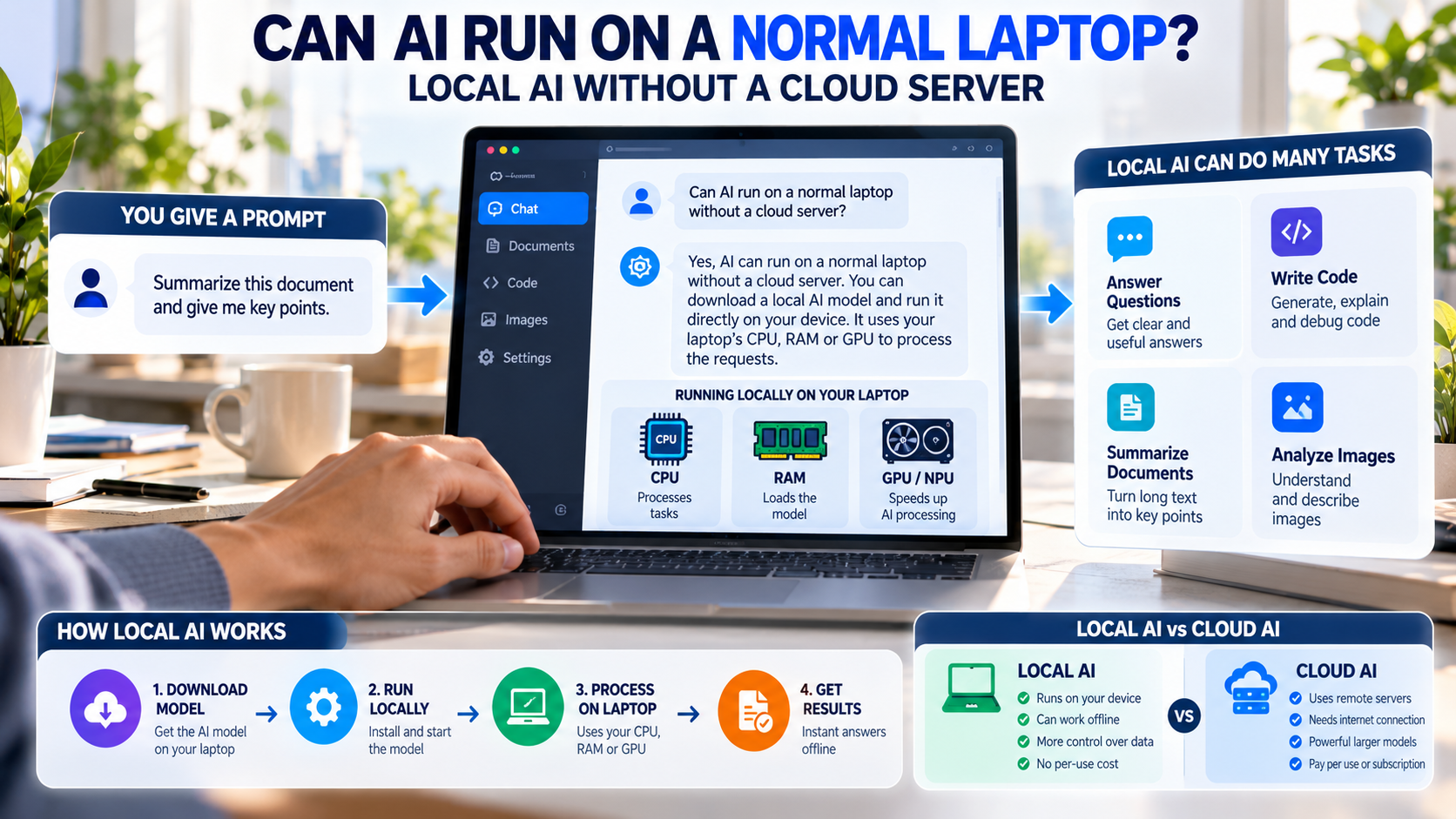
Artificial intelligence (AI) is becoming a part of everyday life. People use AI to write content, generate images, answer questions, summarize documents and write computer code. Many AI tools use powerful cloud servers to process these requests.
But what if you want to run AI directly on your own laptop without sending your information to a remote server?
The good news is that AI can run on a normal laptop without a cloud server. This is possible with local AI models, which use your computer’s processor and memory to perform AI tasks. You do not always need an expensive computer or a permanent internet connection.
However, the performance depends on your laptop’s hardware and the AI model you choose.
What Is Local AI?
Local AI means running an artificial intelligence model directly on your own computer instead of depending on a remote cloud server.
For example, you can install a local AI application, download a compatible model and ask it questions. The model processes your request on your laptop and generates an answer.
Some local AI models can help with writing, coding, document summarization and other everyday tasks. Once the required software and model files are downloaded, supported features can work without an internet connection.
In simple words, local AI allows your computer to perform certain AI tasks on its own.
What Is Cloud AI?
Cloud AI is artificial intelligence that runs on remote computers managed by a cloud provider or service.
When you use a cloud-based AI tool, your request is usually sent to a remote server. The server processes the request and sends the answer back to your device.
Cloud AI services can provide access to powerful models without requiring you to purchase expensive hardware. However, they generally require an internet connection, and how your data is handled depends on the service you use.
How Does AI Work Without a Cloud Server?
AI models learn patterns from large amounts of training data. After training, a model can use those patterns to answer questions, summarize text, generate content or perform other supported tasks.
To run a model locally, you download the model files and use compatible software to load them onto your computer.
When you enter a question, your laptop processes the request using its available hardware. The model generates a response without needing to send the request to a cloud server, provided the application is configured for local processing.
The basic process is:
Download Model → Install Software → Enter a Prompt → Process Locally → Receive an Answer
You may need the internet to download the model or software initially. After that, many local AI tasks can work offline.
What Hardware Do You Need to Run AI on a Laptop?
You do not necessarily need a high-end laptop to start using local AI. However, your computer must have enough resources to run the selected model.
1. RAM: Memory for Running AI
RAM is the computer memory used by running applications. AI models need memory to load their data and process requests.
A laptop with 8 GB of RAM can run some small models, but you may experience limitations when several applications are open. A laptop with 16 GB of RAM is generally a more comfortable starting point for experimenting with many small local language models.
Larger models may require considerably more memory.
2. CPU: The Main Processor
The CPU can run many AI models, even if your laptop does not have a dedicated graphics card.
However, a CPU-only setup may generate responses slowly when using larger models. A modern processor can improve the experience, but the model size and software also matter.
3. GPU: Faster AI Processing
A GPU can accelerate many AI tasks by handling numerous calculations in parallel.
Laptops with compatible dedicated GPUs may run certain models faster or support larger workloads. The available GPU memory is particularly important because the model and its working data must fit within the available resources.
4. NPU: A Processor Designed for AI
Some modern laptops include a Neural Processing Unit (NPU), which is designed to perform certain AI calculations efficiently.
An NPU can help compatible AI applications run supported tasks with lower power consumption. However, an NPU is not necessary for every local AI model. Many models can run using a CPU or GPU instead.
Can a Laptop With 8 GB or 16 GB RAM Run AI?
Yes. Many laptops can run at least some local AI models, but the results depend on the available hardware and the model’s requirements.
A laptop with 8 GB RAM may be suitable for experimenting with smaller models. With 16 GB RAM, you may have more options for local chatbots, coding assistance and document summarization.
Computers with more memory and a powerful compatible GPU can support a wider range of models and workloads.
These are general guidelines, not fixed requirements. Model quantization, context length, operating-system usage and GPU memory can all affect performance.
What Tasks Can Local AI Perform?
AI Chatbots
Local AI chatbots can answer questions, explain concepts, help with writing and summarize text. Their accuracy and reasoning abilities depend on the model.
AI Coding Assistance
Some local models can explain code, suggest functions, generate code snippets and help identify programming errors. Developers can use them to experiment with AI-assisted coding without sending every prompt to an external AI service.
Document Summarization
Local AI can summarize reports, notes and documents stored on your computer. This can be helpful when working with private information, provided the application processes the files locally.
Image Recognition and Generation
Some AI models can analyze images or generate new images on a local computer. Image generation can require significantly more memory and computing power than basic text tasks.
Speech Recognition
Local speech-recognition models can convert spoken words into text. Once the necessary model and software are installed, compatible speech-recognition tasks can work without an internet connection.
Which Software Can Run AI Locally?
Several applications make it easier to download and use AI models on your computer.
Ollama
Ollama helps users download and run compatible AI models locally. It is particularly useful for developers who want to experiment with chatbots, coding models and AI integrations.
Website: https://ollama.com/
LM Studio
LM Studio provides a graphical interface for discovering, downloading and chatting with supported AI models. It is a useful option for people who prefer a desktop application rather than working primarily in a terminal.
Website: https://lmstudio.ai/
Microsoft’s Local AI Tools
Microsoft provides tools and development capabilities for running supported AI models on compatible Windows hardware. Depending on the application and model, processing can use a CPU, GPU or NPU.
These tools have different requirements, so check their documentation before choosing a model.
How Can You Run AI on Your Laptop?
You can get started with local AI without training a model from scratch.
Step 1: Check Your Hardware. Check your laptop’s RAM, processor, GPU and available storage.
Step 2: Choose Local AI Software. Select a tool such as Ollama or LM Studio based on your needs.
Step 3: Download a Compatible Model. Start with a smaller model that fits your computer’s available resources.
Step 4: Load the Model. Use the software to download and start the model.
Step 5: Test Simple Tasks. Ask questions, summarize text or try a small coding task.
Step 6: Test Offline Operation. Disconnect from the internet and check whether your selected model and features still work.
Remember that features such as web search, online model downloads and cloud-based services may stop working when you disconnect.
What Are the Benefits of Running AI Locally?
Better Control Over Your Data
When an AI model processes information entirely on your laptop, you may be able to keep your prompts and documents on your device. This can be useful for private projects and sensitive information.
However, you should check the application’s settings. A local AI application may still use online services or send telemetry unless configured otherwise.
Using AI Without the Internet
Local AI can be useful when travelling, working in areas with poor connectivity or using a device that needs to remain offline.
Once all required files are available, supported tasks can continue without an internet connection.
Lower Ongoing Usage Costs
Some local AI tools and models are available without a per-request API fee. This can be helpful for developers who experiment frequently.
However, local AI is not completely free. You still need suitable hardware, electricity and storage, and some software or models may have licensing costs.
More Control for Developers
Developers can experiment with local chatbots, coding assistants, document search and other AI-powered applications.
Some local AI tools also provide APIs that allow compatible applications to communicate with the model running on the same computer.
What Are the Limitations of Local AI?
Local AI has several limitations that you should understand before choosing it over cloud-based services.
Smaller Models May Be Less Capable
Small models can perform useful tasks, but they may struggle with complex reasoning, difficult coding problems or lengthy documents compared with more capable models.
Performance Depends on Hardware
A laptop with limited memory may run out of resources when loading a large model. Even when the model works, response generation may be slow.
Demanding Tasks Need More Computing Power
High-quality image generation, video generation, large-scale analysis and AI model training can require substantial computing resources.
Local Models May Not Know Recent Events
A downloaded AI model does not automatically receive new information from the internet. To access current information, it may need updated data or a connected search tool.
Not Every Feature Works Offline
An AI application may combine local models with cloud services. Features such as live web search or cloud-based generation may still require an internet connection.
Local AI vs Cloud AI: Which Is Better?
Local AI and cloud AI serve different purposes.
Local AI is useful when you want offline access, more control over your data or the ability to experiment without paying for every API request.
Cloud AI is useful when you need access to powerful models without buying hardware capable of running them. It can also provide convenient access to online information and services.
Neither option is always better. Your choice depends on your budget, privacy requirements, hardware and the tasks you want to perform.
Can Local AI Replace Cloud AI Completely?
Not for everyone or every task.
Local AI can handle many everyday tasks, including answering questions, summarizing documents, assisting with code and processing certain types of images or audio.
However, cloud services may be better suited to some advanced reasoning tasks, demanding media generation or workflows that need current online information.
A practical alternative is hybrid AI, which combines local and cloud processing. An application could process private documents locally and use a cloud service for a separate task that requires more computing power, provided the user permits that data sharing.
Conclusion: Is Local AI Worth Trying?
AI does not always require an expensive cloud server. With suitable software and a compatible model, a normal laptop can run AI locally for tasks such as answering questions, summarizing documents, helping with code and processing certain types of images or audio.
Your laptop’s memory, processor, graphics hardware and the size of the AI model will determine how well it performs. Smaller models are generally easier to run, while larger models may require more computing power.
Local AI offers useful advantages, including offline access, greater control over data and reduced dependence on cloud services. However, it also has limitations in performance, model capability and access to current information.
For many people, a combination of local and cloud AI will be the most practical choice.
In simple words, you do not need a powerful data center to start using AI. Your own laptop may already be capable of running a useful AI model.
