AI models are becoming much better at understanding questions, writing code, analyzing information and solving problems. But an AI model cannot automatically access every application, database, file or business system.
For example, an AI assistant may understand that you want to check a GitHub issue, search a database or update a project task. But it needs a way to communicate with those external systems.
This is where Model Context Protocol (MCP) becomes important. MCP is an open standard that helps AI applications connect with external tools and data in a common way. OpenAI Developers
What Is Model Context Protocol (MCP)?
Model Context Protocol, commonly called MCP, is a standard that allows AI applications to connect with external tools, data and services.
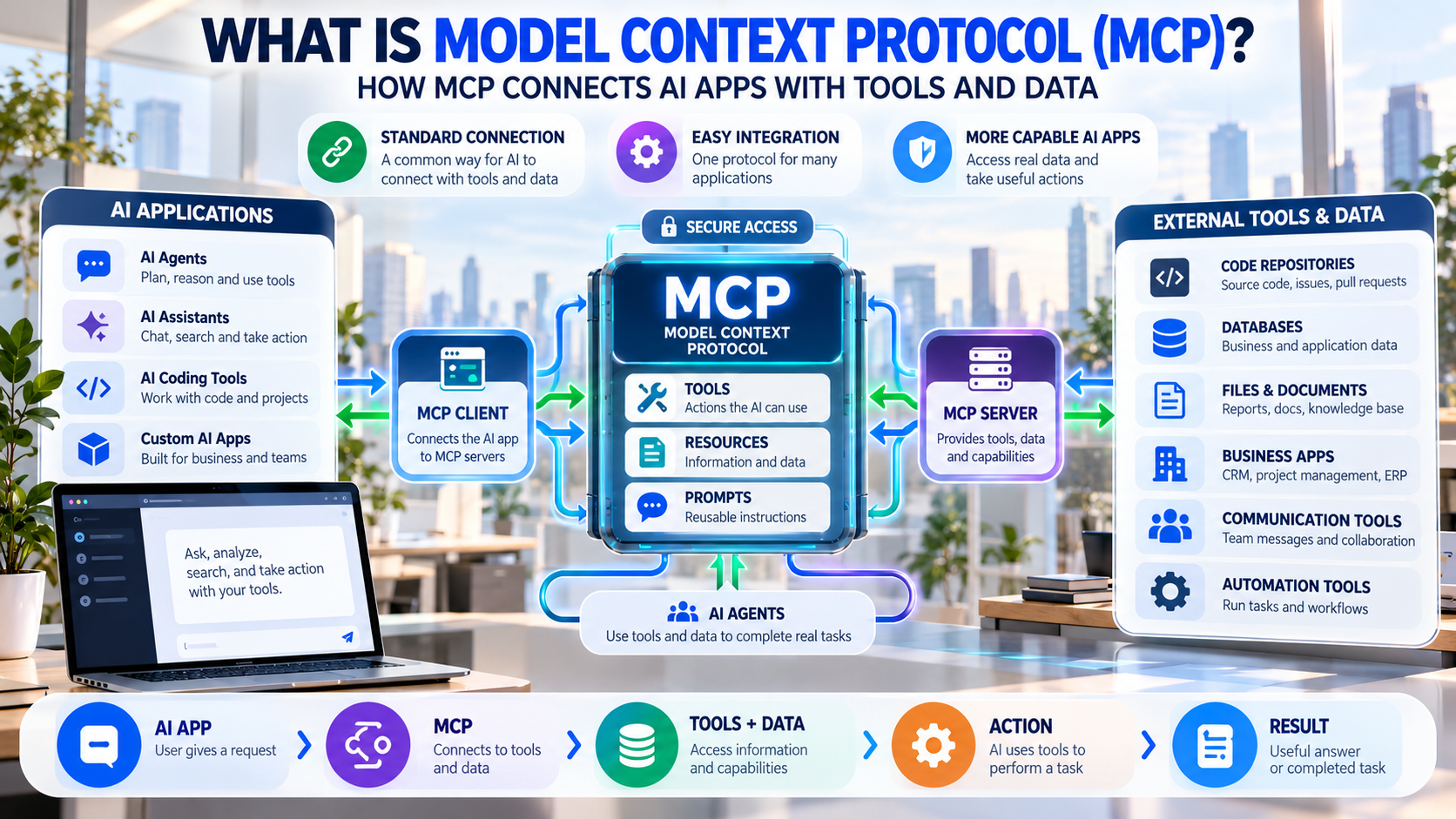
In simple words, MCP works like a common connection system for AI.
Instead of building a completely different integration for every AI application and every software service, developers can use MCP to create a standard connection between AI and external systems.
For example, an AI application could use MCP to connect with GitHub, databases, documentation, business software or other tools.
Why Was MCP Created?
Before protocols like MCP, developers often needed to create custom integrations between AI applications and different services.
Imagine an AI application needs to work with:
GitHub + Slack + Database + CRM + Internal Documents
Each service may have its own API and integration requirements. Managing many separate integrations can become complicated.
MCP provides a common way for AI applications to discover and use tools and information from connected systems. This can make AI integrations easier to build and reuse.
How Does MCP Work?
The basic MCP workflow can be understood like this:
AI Application → MCP Client → MCP Server → External Tool or Data
The AI application communicates with an MCP server. The MCP server provides information about the tools it has available.
The AI can then choose an appropriate tool, send the required information, receive the result and continue working on the user’s request. OpenAI’s current MCP documentation describes this process as discovering available tools, selecting a tool, sending its arguments to the server and using the returned result. OpenAI Developers
What Is an MCP Server?
An MCP server is a program that makes tools, information or other capabilities available to an AI application through MCP.
For example, a company could create an MCP server for its internal database.
The server could provide tools such as:
Search Customer
Get Order Details
Check Inventory
Create Support Ticket
The AI application does not need to understand the entire internal system. It can use the capabilities that the MCP server exposes.
MCP servers can provide tools, resources, prompts and instructions to compatible AI applications. OpenAI Developers
What Is an MCP Client?
An MCP client is the part of an AI application that communicates with MCP servers.
Think of the client as the connection layer between the AI application and the MCP server.
For example:
AI Coding Assistant → MCP Client → GitHub MCP Server
The MCP client helps the AI application discover and use the tools provided by the server.
What Are MCP Tools?
MCP tools are actions that an AI application can use.
For example, an MCP server could provide tools such as:
- Search documents
- Search GitHub issues
- Read customer information
- Query a database
- Create a task
- Update a record
When a user asks for something that matches an available tool, the AI can decide whether to use that tool.
OpenAI’s documentation describes MCP tools as functions with structured inputs that a model can call through an MCP server. OpenAI Developers
What Are MCP Resources?
MCP can also provide resources, which are information or content that an AI application can access.
For example, resources could include:
- Documents
- Project information
- Database information
- Documentation
- Files
- Other application data
This allows an AI application to work with information from external systems instead of relying only on information already available inside the AI model.
What Are MCP Prompts?
MCP can also provide reusable prompt templates.
These prompts can help define specific workflows for an AI application.
For example, an MCP server could provide a prompt such as:
“Review this software issue and suggest possible solutions.”
Another could be:
“Summarize the latest customer support requests.”
This makes it easier to package useful instructions together with the tools and information required for a particular workflow. OpenAI Developers
How Does MCP Connect AI With GitHub?
MCP can be particularly useful for software development.
Imagine you ask an AI coding assistant:
“Check the open issues in this project and identify the most important bugs.”
The AI needs access to the GitHub repository to complete that task.
With an appropriate MCP connection, the workflow could look like:
User → AI → MCP → GitHub → Issues → AI Analysis → Result
The AI can retrieve the relevant information and use it to provide an answer.
MCP can therefore help turn an AI coding assistant into a more capable development tool.
Can MCP Connect AI to Databases?
Yes.
MCP can also be used to expose selected database capabilities to an AI application.
For example, a business employee could ask:
“How many orders did we receive this month?”
An authorized AI application could use an MCP database tool to retrieve the relevant information and explain the result.
The important point is that the AI does not need unrestricted access to the entire database. Developers can design specific tools and permissions for the information and actions that should be available.
Can MCP Connect AI to Business Applications?
Yes.
This is one of the reasons MCP is becoming important for enterprise AI.
AI applications can potentially work with systems such as:
- CRM software
- Project management platforms
- Customer support systems
- Databases
- Internal documentation
- Communication tools
- Business applications
For example, an employee could ask:
“Find the customer’s latest order and create a follow-up task.”
The AI could retrieve information from one connected system and perform an authorized action in another.
OpenAI’s current MCP support includes workflows that can go beyond reading information and support write or modification actions when the connected system and permissions allow them. OpenAI Help Center
Why Is MCP Important for AI Agents?
AI agents need access to tools and external information if they are expected to complete real-world tasks.
An AI model can generate an answer, but an AI agent may need to:
Find information → Make a decision → Use a tool → Perform an action → Check the result
MCP can provide a standardized connection between the AI agent and those external tools.
This makes MCP especially useful for the growing world of agentic AI.
MCP Can Help AI Move Beyond Chat
Traditional AI applications often work like this:
User → Question → AI → Answer
AI applications connected to tools can work more like this:
User → Request → AI → Tool → External System → Result → AI → Action/Answer
This is a major difference.
The AI is no longer limited to generating text. With appropriate tools and permissions, it can interact with software systems and complete parts of a workflow.
Why Is MCP Important for AI Developers?
MCP can make AI integrations more reusable.
Instead of building a completely different integration for every AI application, developers can expose selected capabilities through an MCP server.
For example, a company could create an MCP server for its ERP software.
That server could provide tools such as:
Get Inventory → Create Order → Check Customer → Generate Report
Compatible AI applications could then use those capabilities according to their permissions.
MCP therefore creates an additional integration layer between AI applications and existing software systems.
MCP and AI Coding Agents
MCP is especially interesting for AI coding agents.
A coding agent may need access to source code, issues, documentation, testing systems and other development tools.
With MCP, a workflow could look like:
GitHub → Documentation → Database → Testing → Deployment
The AI agent can use the tools it needs to work on a larger development task.
For example:
Read issue → Understand code → Make changes → Run tests → Check results
This can help AI coding systems become more useful for complete software-development workflows.
MCP and Multi-Agent AI
MCP can also be useful when multiple AI agents work together.
For example:
Planning Agent
↓
Coding Agent
↓
Testing Agent
↓
Deployment Agent
Different agents may need access to different tools.
MCP can provide a common way for these agents to interact with external capabilities.
This could help developers build more modular AI systems where different agents specialize in different tasks.
Is MCP the Same as an API?
No.
MCP and APIs are related, but they are not the same thing.
An API allows software applications to communicate with a particular service.
MCP provides a standardized way for AI applications to discover and use tools and information exposed by MCP servers.
A simple way to understand the difference is:
API:
“How can software communicate with this service?”
MCP:
“How can an AI application discover and use tools and information from connected services?”
An MCP server can also work with existing APIs, databases and internal systems.
So MCP does not necessarily replace APIs. Instead, it can act as an AI-friendly integration layer.
What Are the Main Benefits of MCP?
Easier AI Integration
MCP gives developers a common approach for connecting AI applications with external tools and data.
Better AI Agents
AI agents can use external tools instead of only generating text.
Reusable Connections
An MCP server can potentially be used by multiple compatible AI applications.
Better Access to Data
AI applications can work with information from connected systems.
More Automation
AI can perform authorized actions in external applications.
Flexible AI Applications
Developers can build AI systems that interact with many different tools and services.
Is MCP Secure?
MCP can enable powerful access to external systems, so security is extremely important.
An AI that can only read information has different risks from an AI that can modify records or perform business actions.
Developers should carefully manage:
- Authentication
- Authorization
- User permissions
- Data access
- Tool permissions
- Input validation
- Approval workflows
- Audit logs
- Sensitive information
OpenAI’s documentation specifically warns that remote MCP servers can introduce risks because they may access or send sensitive information, and recommends appropriate approval and security controls for sensitive actions. OpenAI Developers
Can MCP Perform Actions Automatically?
Yes, if the MCP server provides tools that allow those actions and the AI application has the required permissions.
For example, an AI agent could potentially:
Create a GitHub issue
Update a CRM record
Create a project task
Search a database
Send information to another application
However, sensitive actions should generally have appropriate approval and permission controls.
The goal is not to give AI unlimited access. The goal is to give AI controlled access to the right tools.
What Is Remote MCP?
An MCP server can run remotely instead of only running on the developer’s computer.
A remote MCP server can be hosted on a server and accessed by compatible AI applications.
For example:
AI Application → Internet → Remote MCP Server → Business System
OpenAI’s current documentation supports connecting models to remote MCP servers as well as private/local MCP servers through secure connection mechanisms. OpenAI Developers
Why Is MCP Important for the Future of Software?
Software is moving from simple applications toward AI-powered agents and automated workflows.
In the future, users may not always open five different applications to complete a task.
Instead, they may simply tell an AI agent what they want.
For example:
“Find the customer → check their order → create a support ticket → notify the team.”
The AI agent could coordinate these steps using connected tools.
MCP can help provide the connection layer required for these kinds of AI workflows.
What Is the Future of MCP?
MCP is becoming part of the growing ecosystem around AI agents and tool-based AI applications.
Current AI platforms already support MCP-based connections, and OpenAI provides MCP support for connecting models with remote and private MCP servers. OpenAI Developers
As AI agents become more capable, their ability to use external tools will become increasingly important.
The basic idea can be summarized as:
AI Model → MCP → Tools & Data → Action → Result
This could make MCP an important part of future AI software development.
Conclusion
Model Context Protocol (MCP) is a standard that helps AI applications connect with external tools, data and services.
In simple terms, MCP gives AI a common way to interact with the software systems around it.
Instead of an AI only answering questions, MCP can help it access information, use tools and, when properly authorized, perform actions.
This makes MCP especially useful for AI agents, AI coding tools, enterprise applications, automation and multi-agent systems.
The future of AI may not be just about building smarter models. It will also be about giving those models safe and useful connections to the digital world.
