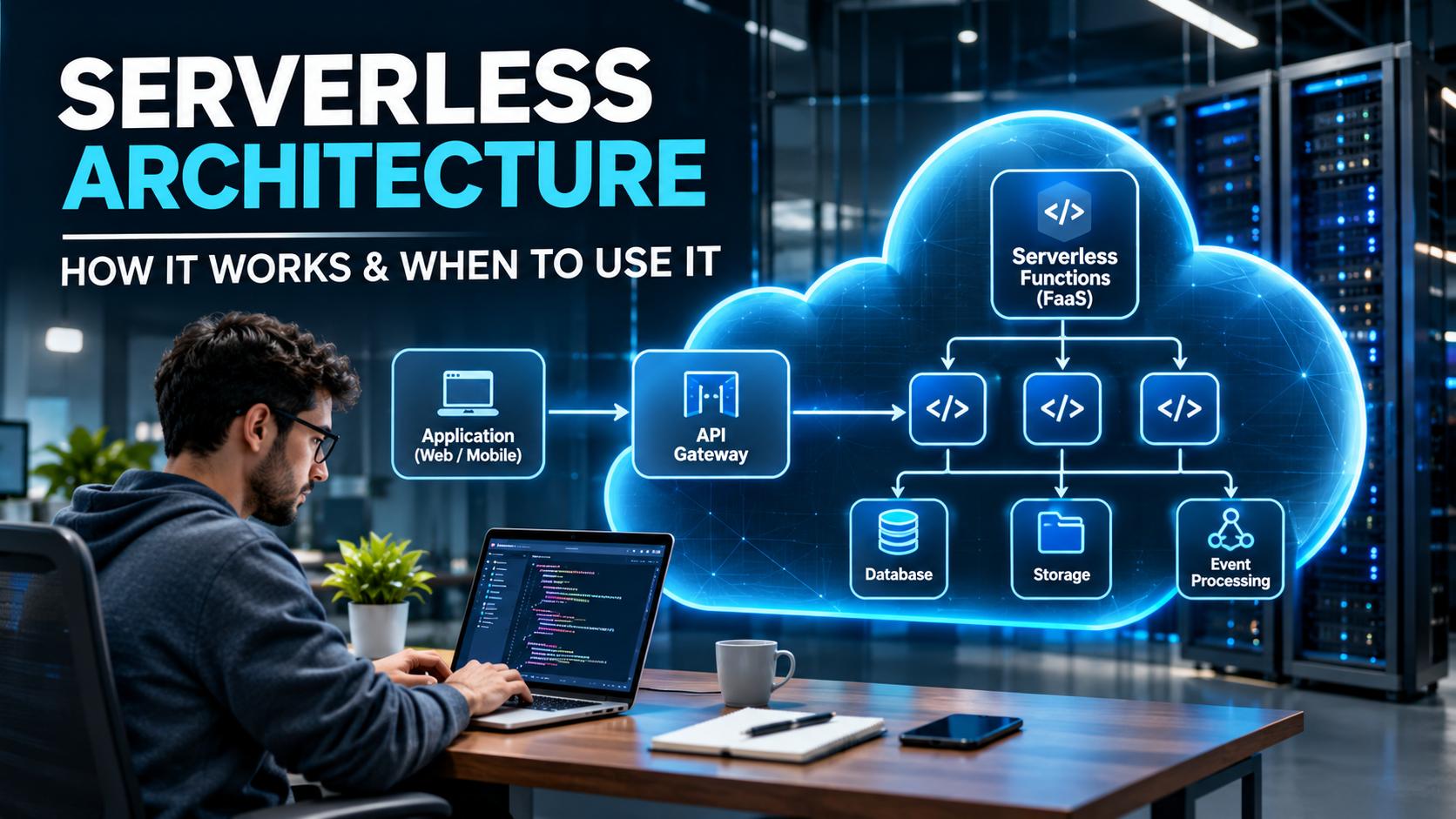
When developers build an application, they need a place to run their code. Traditionally, they use physical servers, virtual machines, or cloud servers. These servers require setup, maintenance, monitoring, and sometimes manual scaling.
Serverless architecture is a way to build applications without managing the servers directly. A cloud provider manages the underlying infrastructure, while developers focus on writing code and building application features.
For example, imagine you are building an online shopping website. When a customer places an order, your application needs to save the order details, update stock, and send a confirmation email. With serverless architecture, you can use cloud services to handle these tasks without managing the servers that run them.
Does Serverless Mean There Are No Servers?
No. Serverless does not mean that servers disappear. Applications still run on servers, but the cloud provider manages most of the infrastructure behind the scenes.
Developers do not usually need to set up individual servers, install operating systems, or manually manage server capacity for every function. Instead, they deploy their code to a serverless platform, which runs it when needed.
This allows development teams to spend more time improving their applications and less time maintaining infrastructure.
Why Is Serverless Architecture Becoming Popular?
Serverless architecture is useful because modern applications often experience changing levels of traffic. A website may receive hundreds of visitors during normal hours and thousands during a special promotion.
Managing servers for these changes can be difficult and expensive. Serverless services can automatically adjust computing resources according to demand, within the limits of the selected platform.
This approach can simplify application development, reduce infrastructure maintenance, and help businesses handle changing workloads.
Category 2: How Serverless Architecture Works
Step 1: A User Performs an Action
The process begins when a user or another system performs an action. This action is called an event.
For example, a user might submit a registration form, upload an image, place an order, or request information from a website.
These actions can trigger specific functions in a serverless application.
Step 2: The Cloud Platform Receives the Request
When an event occurs, the cloud platform receives the request and directs it to the appropriate function or service.
For example, when a user clicks the Login button, the frontend application can send a request to a backend API. The API routes the request to the code responsible for handling the login process.
Step 3: A Function Executes the Code
A serverless function is a small piece of code that performs a particular task.
For example, a function might check login details, calculate an order total, validate a form, or process an uploaded document.
The cloud provider manages the environment required to run the function, so developers do not need to maintain the underlying servers themselves.
Step 4: The Function Communicates with Other Services
Many applications need to store information or communicate with other systems. A serverless function can connect to a database, file storage service, payment provider, or another API.
For example, after validating an order, a function may save the order details in a database and trigger another process to send a confirmation email.
Step 5: The Application Returns a Result
After completing its task, the function can return a response to the application or trigger another event.
For example, a website might display a success message after a registration request has been processed. A background function might process an uploaded file without requiring the user to wait for every processing step to finish.
Step 6: Resources Adjust According to Demand
When more requests arrive, the cloud platform can run additional function instances, subject to its service limits and configuration. When requests decrease, it can reduce the resources being used.
Some serverless services can scale down to zero when there is no work to perform. This can help reduce costs for applications that do not need to run continuously.
Category 3: Main Components of Serverless Architecture
1. Function as a Service (FaaS)
Function as a Service, also called FaaS, allows developers to run individual functions when an event or request occurs.
For example, an application might use one function to register a user, another to process an order, and a third to generate a report.
Popular examples include AWS Lambda, Azure Functions, and Google Cloud Run functions.
Each function can handle a specific task, making it easier to organize certain types of application logic.
2. Backend as a Service (BaaS)
Backend as a Service provides ready-made backend features that developers can connect to their applications.
These features may include user authentication, database access, file storage, and notifications.
For example, instead of building every authentication feature from scratch, a developer can use a managed authentication service to handle user registration and login.
BaaS can reduce development effort, especially when an application needs common backend features.
3. API Gateway
An API gateway acts as an entry point for requests sent from a frontend application to backend services.
For example, a React application might request product details through an API endpoint. The API gateway receives the request and directs it to the appropriate backend function.
Depending on the service, an API gateway can also support authentication integration, traffic management, and request routing.
4. Cloud Database
Applications need databases to store information such as customer details, products, orders, and transactions.
Serverless applications can use managed databases that reduce the need to manage database infrastructure directly.
Examples include Amazon DynamoDB, Amazon Aurora Serverless, and Cloud Firestore.
A serverless application does not always require a serverless database. The right database depends on the application’s data, query requirements, performance needs, and budget.
5. Event and Messaging Services
Event and messaging services allow different application components to communicate with each other.
For example, when an order is placed, an event can trigger separate tasks to update inventory, send an email, and record information for analytics.
These services help developers separate tasks and process some operations in the background.
Category 4: A Real-World Example of Serverless Architecture
How Serverless Works in an Online Shopping Website
Imagine that a customer purchases a product from an online shopping website.
First, the customer clicks the Place Order button. The frontend sends the order details to an API gateway, which directs the request to a serverless function.
The function checks the order details and communicates with the required services. Once the order is processed, the application saves the information in a database.
The system can then trigger additional tasks, such as sending an order confirmation email or updating inventory.
Each task can be handled by a suitable function or managed service. This means the development team does not need to manage a separate server for every task.
What Happens When Website Traffic Increases?
Suppose the website receives a large number of orders during a festival sale.
The serverless platform can run additional function instances to handle the increased workload, subject to configured limits and service quotas.
When traffic decreases, the platform can reduce the resources used by those functions.
However, the entire application still needs careful planning. Database capacity, payment processing, request limits, error handling, and duplicate orders must all be considered.
Category 5: Benefits of Serverless Architecture
1. Automatic Scaling
Serverless platforms can automatically adjust the number of function instances according to incoming requests and events.
This is useful for websites and applications where traffic changes throughout the day.
For example, an event-booking website may receive a sudden increase in visitors when registration opens. Serverless functions can scale to handle additional requests within the platform’s limits.
2. Less Server Maintenance
Managing servers often involves software updates, infrastructure monitoring, security patches, and capacity planning.
Serverless architecture reduces many of these responsibilities because the cloud provider manages the underlying infrastructure.
Developers can spend more time writing code, fixing application issues, and building new features.
3. Pay for What You Use
Many serverless services charge according to usage, such as the number of requests, execution time, or resources consumed.
This can be useful for applications that receive occasional requests instead of running at full capacity all day.
However, serverless is not always cheaper. High traffic, database usage, network requests, logging, and other cloud services can increase the total cost.
4. Faster Application Development
Serverless platforms provide ready-to-use services for running code, handling requests, storing data, and processing events.
Developers can connect these services instead of building and maintaining every infrastructure component themselves.
This can help teams build prototypes, release features, and test new ideas more quickly.
5. Better Support for Automated Tasks
Serverless architecture works well for tasks that start when a particular event occurs.
Examples include sending notifications, processing files, generating reports, and updating records.
Businesses can use these functions to automate repetitive work and reduce manual effort.
6. Independent Application Functions
Developers can divide some application tasks into separate functions.
For example, a shopping application might use different functions for order validation, invoice generation, and email notifications.
This can make individual tasks easier to update and test. However, using too many functions can make the application harder to understand, so the architecture should remain simple and well organized.
Category 6: Disadvantages of Serverless Architecture
1. Cold Starts
A cold start happens when a cloud platform needs to prepare an execution environment before running a function.
This preparation can add extra time to a request, particularly when a function has not been used recently.
Cold starts may affect applications that require consistently fast response times. Developers can reduce their impact by optimizing function code and using platform-specific features when appropriate.
2. Vendor Lock-In
Serverless applications often depend on services and tools provided by a particular cloud platform.
For example, an application may use a provider-specific database, event system, and authentication service. Moving the application to another provider could require code changes and additional work.
Developers can reduce this risk by documenting dependencies and using portable technologies where practical.
3. Difficult Debugging
A single user action may trigger several functions and cloud services.
If something goes wrong, developers may need to inspect logs from multiple components to find the problem.
Centralized logging, monitoring, distributed tracing, and clear error messages can make debugging easier.
4. Function Execution Limits
Serverless functions may have restrictions on execution time, memory, concurrency, and other resources.
These restrictions vary between cloud providers and services.
Applications that require long-running processing or continuous computation may need containers, virtual machines, or a combination of different technologies.
5. Security Responsibilities
Cloud providers manage the underlying infrastructure, but developers must still secure their application code and configurations.
Important practices include protecting API endpoints, validating user input, managing secrets safely, and granting only the permissions each function needs.
Serverless architecture reduces some infrastructure responsibilities, but it does not automatically make an application secure.
6. Unexpected Cloud Costs
Serverless services can become expensive if an application receives more requests than expected or repeatedly triggers unnecessary processing.
For example, a function that accidentally triggers itself in a loop could generate excessive usage.
Developers should monitor usage, configure budget alerts, and prevent unnecessary repeated executions.
Category 7: When Should You Use Serverless Architecture?
1. Building APIs and Backend Services
Serverless functions can handle requests from websites and mobile applications.
For example, a React or Next.js application can use a serverless backend to retrieve product information, register users, or process form submissions.
This approach is useful when an application needs a flexible backend without requiring the development team to manage every server.
2. Processing Images and Documents
Serverless functions can automatically process files when users upload them.
For example, an application can resize an image, generate a thumbnail, or extract information from a document after an upload.
This approach is useful for applications that handle files, provided the processing task fits the selected service’s limits.
3. Running Scheduled Tasks
Some applications need to perform tasks at specific times.
Examples include generating daily reports, sending reminders, cleaning up expired records, and synchronizing information between systems.
Serverless functions can run when scheduled events occur, reducing the need to maintain dedicated servers for occasional jobs.
4. Automating Business Workflows
Businesses can use serverless architecture to automate processes that begin when specific events happen.
For example, an ERP system could send a notification when a purchase order is approved or start a report-generation task when new records are added.
This can reduce manual work and connect different parts of a business application.
5. Handling Unpredictable Website Traffic
Serverless architecture can be useful for websites with changing traffic levels.
Examples include ticket-booking platforms, event-registration systems, seasonal campaigns, and online forms.
The platform can adjust function resources according to demand, subject to service limits and configuration.
6. Developing Prototypes and MVPs
Startups and development teams can use serverless services to build prototypes and minimum viable products.
Managed services can reduce the initial infrastructure work and allow teams to test ideas more quickly.
Before launching a production application, teams should still evaluate reliability, security, monitoring, performance, and cost.
Category 8: When Should You Avoid Serverless Architecture?
1. Applications with Long-Running Processes
Some serverless functions have strict execution time limits.
If your application needs to perform continuous processing or tasks that take a long time, containers or virtual machines may be more suitable.
2. Applications Requiring Consistently Low Latency
Some applications need extremely predictable response times.
If cold starts or platform-specific execution behavior affect performance, another hosting approach may provide better control.
The right choice depends on the platform, workload, and latency requirements.
3. Applications with Continuous High Usage
If your application constantly uses a large amount of computing power, continuously running infrastructure may sometimes be more cost-effective.
You should compare the total cost of serverless services, containers, and virtual machines before choosing an architecture.
4. Applications Requiring Extensive Infrastructure Control
Some systems require detailed control over operating systems, networking, runtime environments, or specialized hardware.
Serverless platforms abstract away many of these details. Virtual machines or containers may be more suitable when direct control is important.
5. Applications with Complex Provider Dependencies
If your application relies heavily on services from one cloud provider, moving it to another provider may be difficult.
Consider portability requirements before committing to a particular serverless platform.
Category 9: Popular Serverless Platforms
1. Amazon Web Services (AWS)
AWS provides services for building serverless applications.
AWS Lambda runs code in response to supported events and requests. Amazon API Gateway manages APIs, while services such as Amazon S3 and Amazon DynamoDB provide storage capabilities.
These services can be combined to build backend APIs, file-processing systems, and automated workflows.
2. Microsoft Azure
Microsoft Azure offers Azure Functions for running event-triggered code and Logic Apps for workflow automation.
These services can be useful for applications that need to connect business systems, process events, and automate repetitive tasks.
3. Google Cloud
Google Cloud provides services for running functions, applications, and event-driven workloads.
Cloud Run supports containerized applications without requiring users to manage the underlying servers directly. Cloud Run functions can execute code in response to supported events and requests.
Google Cloud also offers managed database and storage services that can be combined with serverless applications.
Which Serverless Platform Should You Choose?
The best platform depends on your existing technology stack, budget, security requirements, preferred programming languages, integrations, and deployment needs.
Compare service limits, pricing, regional availability, monitoring tools, and database options before making a decision.
Category 10: Serverless Architecture vs. Microservices
What Is the Difference?
Serverless architecture and microservices are related, but they describe different things.
Microservices is a way to design an application as a collection of smaller, independently deployable services. Serverless architecture is an approach that reduces the need to manage the underlying computing infrastructure.
A microservices application can run on containers, virtual machines, or serverless services.
Similarly, a serverless application can use functions, managed databases, messaging services, and other cloud components.
Which Approach Is Better?
Neither approach is automatically better for every application.
Serverless may be a good fit when you want to reduce infrastructure management and run code in response to events.
Microservices may be suitable when different teams need to develop, deploy, and scale parts of an application independently.
The two approaches can also be combined. For example, a microservices-based application might use serverless functions for notifications and background processing.
Category 11: Best Practices for Serverless Application Development
1. Keep Functions Simple
Each function should have a clear purpose. Simple functions are generally easier to test, understand, and maintain.
2. Handle Errors Properly
Network failures, database problems, and third-party API errors can interrupt processing.
Use suitable timeouts, retries, and error-handling strategies. Make sure retries do not accidentally create duplicate payments, orders, or transactions.
3. Protect Sensitive Information
Store secrets securely, validate user input, and apply least-privilege permissions.
Review access controls for functions, APIs, databases, and storage services.
4. Monitor Performance and Costs
Track execution times, failed requests, usage, and downstream service performance.
Set up alerts to identify unexpected errors or cost increases before they become serious problems.
5. Avoid Unnecessary Dependencies
Too many connections between functions can make an application difficult to maintain.
Design clear communication paths and use messaging or workflow services when they help simplify complex processes.
6. Test Before Deployment
Test your functions locally and in a suitable cloud environment.
Check how the application behaves when requests fail, services become unavailable, or traffic increases.
7. Choose the Right Architecture
Do not select serverless simply because it is popular.
Compare serverless computing with containers and virtual machines based on your application’s performance, security, cost, and maintenance requirements.
Category 12: Frequently Asked Questions (FAQs)
1. What Is Serverless Architecture in Simple Words?
Serverless architecture is a way to build applications where the cloud provider manages the underlying servers. Developers focus on writing application code instead of maintaining the server infrastructure directly.
2. Does Serverless Mean There Are No Servers?
No. Servers still run the application. The difference is that the cloud provider manages much of the infrastructure behind the scenes.
3. Is Serverless Architecture Cheaper?
It can be cheaper for applications with variable traffic or occasional workloads. However, applications with continuous, high usage may be cheaper to run on other infrastructure.
4. What Is FaaS in Serverless Computing?
FaaS stands for Function as a Service. It allows developers to run individual functions when an event or request triggers them.
5. Can Serverless Architecture Be Used for Web Applications?
Yes. It can support backend APIs, form submissions, user authentication workflows, file processing, notifications, and other web application features.
6. What Is a Cold Start?
A cold start occurs when a platform needs to initialize an execution environment before running a function. This can add latency to some requests.
7. Is Serverless Architecture Secure?
It can be secure when configured correctly. Developers must still protect application code, APIs, permissions, databases, and sensitive information.
8. What Are Popular Serverless Platforms?
Popular options include AWS Lambda, Azure Functions, and Google Cloud services such as Cloud Run and Cloud Run functions.
9. What Is the Difference Between Serverless and Cloud Computing?
Cloud computing is a broad category of computing services delivered over a network. Serverless is one approach within cloud computing that reduces the need to manage infrastructure directly.
10. Is Serverless Suitable for Every Application?
No. Serverless is useful for many event-driven applications, but execution limits, latency, cost, and infrastructure-control requirements may make other approaches better for some workloads.
Conclusion
Serverless architecture makes it possible to build and run applications without directly managing the underlying servers. The cloud provider handles much of the infrastructure work, allowing developers to focus on application features and business requirements.
It can be useful for building APIs, processing files, automating business tasks, running scheduled jobs, and handling changing website traffic.
However, serverless also comes with challenges, including cold starts, execution limits, vendor lock-in, security responsibilities, and potentially unpredictable costs.
The best approach is to choose serverless when its benefits match your application’s needs. Understanding how it works, where it fits, and what limitations it has will help you make better software architecture decisions.
