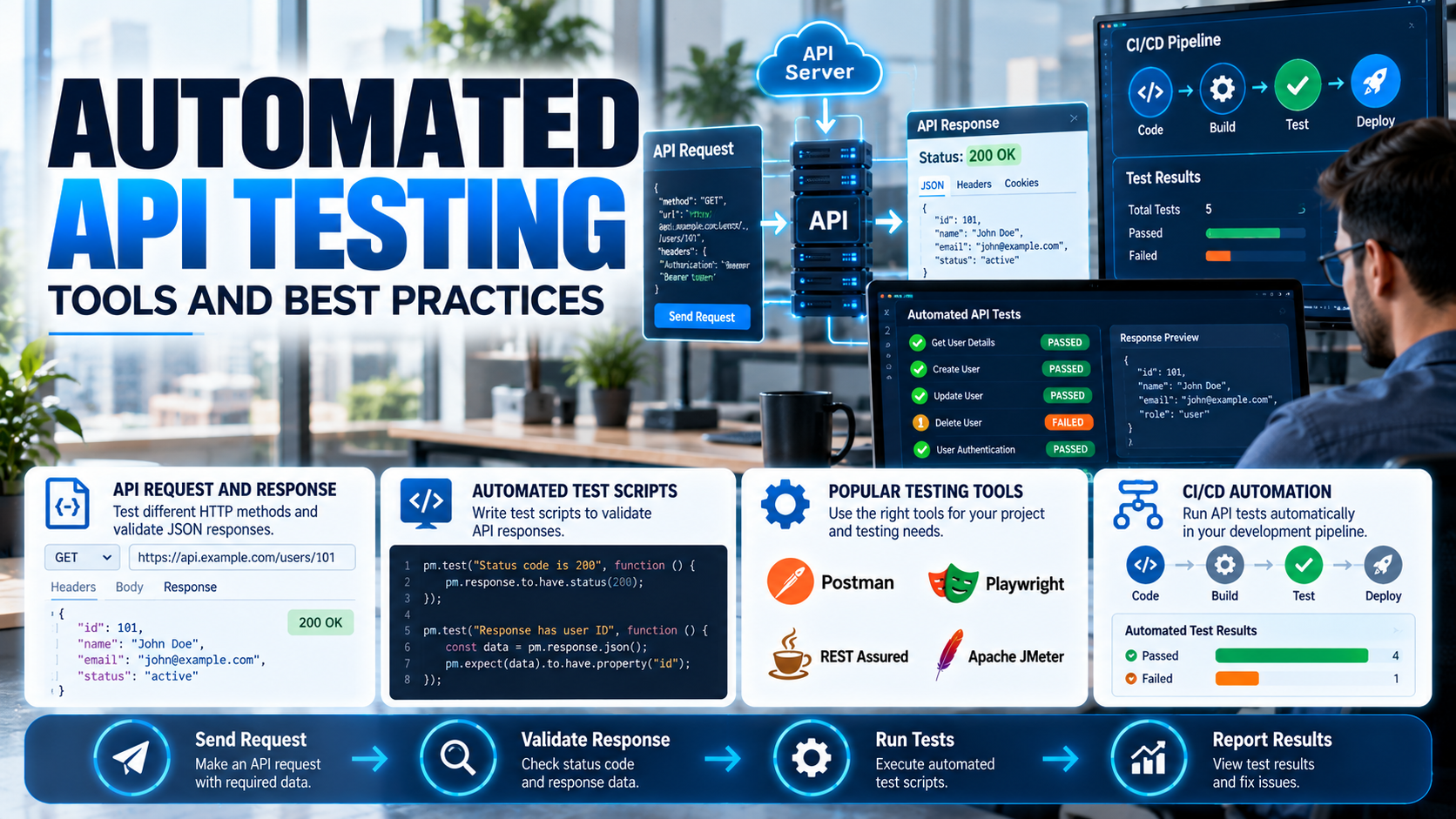
Modern applications depend on APIs to exchange data between frontend interfaces, backend services, databases, and third-party platforms. If an API fails, users may experience login problems, incorrect information, payment failures, or other application errors.
Testing every API manually can take a lot of time, especially when an application has many endpoints. Automated API testing helps developers run tests automatically, validate responses, identify errors, and check whether an API continues to work after code changes.
Tools such as Postman, REST Assured, Playwright, and other testing frameworks help development teams test APIs more consistently. By following the right practices, teams can improve software quality, reduce repetitive work, and detect problems before they reach production.
In this guide, we will explain what automated API testing is, how it works, which tools developers can use, and the best practices for building reliable API tests.
1. What Is Automated API Testing?
Automated API testing is the process of using scripts or testing tools to send requests to an API and verify its responses automatically.
An API, or Application Programming Interface, allows different software components to communicate with one another. For example, when a user logs into a website, the frontend sends login information to a backend API. The API checks the credentials and returns a response.
Automated tests can verify whether this process works as expected without requiring a developer to check every response manually.
Common checks include:
- HTTP status codes, such as 200, 201, 400, and 500.
- Response data and JSON structure.
- Authentication and authorization.
- Required fields and input validation.
- Response time and performance.
- Error messages and failure handling.
- Data creation, updates, and deletion.
Automated API testing can be used during development, integration testing, regression testing, and continuous integration pipelines. It complements manual testing rather than replacing every form of manual verification.
2. Why Is Automated API Testing Important?
API testing is important because APIs often connect several parts of an application. A problem in one endpoint can affect multiple features.
2.1 Saves Time and Effort
Manual testing requires testers to repeat the same requests whenever an API changes. Automated tests can execute these checks repeatedly with less manual effort.
2.2 Detects Bugs Early
Automated tests can run while developers are building a feature. This makes it easier to identify problems before they affect other components or reach production.
2.3 Improves Reliability
Repeated tests help confirm that an API behaves consistently across different inputs, environments, and software updates.
2.4 Supports Regression Testing
Regression testing checks whether new code changes have broken existing functionality. Automated API test suites can rerun important scenarios after every relevant change.
2.5 Improves Development Speed
When tests provide quick feedback, developers can identify and fix issues earlier instead of spending time investigating problems reported after deployment.
2.6 Supports Continuous Integration and Delivery
Automated API tests can run in CI/CD pipelines whenever code is pushed or a build is prepared. Teams can use the results to identify failures before releasing changes.
3. How Does Automated API Testing Work?
Automated API testing follows a structured process. The exact steps depend on the testing tool and application architecture.
Step 1: Identify the API Endpoint
Choose the endpoint that needs to be tested.
Example:
GET /api/users/101
This endpoint might return information about a user with ID 101.
Step 2: Prepare the Request
Configure the HTTP method, URL, headers, authentication, query parameters, and request body where required.
For example, a POST request to create a user may include a JSON body containing the user’s name and email address.
Step 3: Send the Request Automatically
The testing tool sends the request to the API server. The server processes it and returns a response.
Step 4: Validate the Response
The test checks whether the response matches the expected result. This may include checking the status code, required fields, data types, and business rules.
Step 5: Record the Test Result
The testing tool reports whether the test passed or failed. Developers can investigate failures and correct the underlying issue.
Step 6: Run Tests Automatically
The test suite can be scheduled or connected to a CI/CD pipeline so that important checks run whenever the application changes.
4. Types of Automated API Testing
Different API tests serve different purposes. A reliable testing strategy usually combines several types.
4.1 Functional Testing
Functional testing checks whether an endpoint performs its intended task.
For example, a login API should authenticate valid credentials and reject invalid ones.
4.2 Integration Testing
Integration testing checks whether different services or components work together correctly.
For example, an order API may need to communicate with inventory, payment, and notification services.
4.3 Regression Testing
Regression testing verifies that existing API functionality continues to work after code changes, bug fixes, or new feature releases.
4.4 Contract Testing
Contract testing checks whether an API request and response follow an agreed specification. It can help detect unexpected changes in fields, data types, or response formats that may break consumers.
4.5 Performance and Load Testing
Performance testing measures how an API behaves under different workloads. It can evaluate response times, throughput, and error rates as request volume increases.
Load tests should be performed in an authorized test environment or under an approved testing plan.
4.6 Security Testing
Security testing checks for issues involving authentication, authorization, input validation, and access control. Automated tests can verify that users cannot access data or operations they are not permitted to use.
Security testing requires additional specialized checks because ordinary functional tests cannot identify every security vulnerability.
5. Best Tools for Automated API Testing
The right tool depends on the programming language, project requirements, team experience, and existing development workflow.
5.1 Postman
Postman is a widely used tool for sending API requests, examining responses, and writing automated tests.
Key features include:
- Support for common HTTP methods.
- JavaScript-based test scripts.
- Collections for organizing related requests.
- Environment variables for different configurations.
- Automated test runs through the Collection Runner and Postman CLI.
- Integration with CI/CD workflows.
Best for: Beginners, manual API exploration, QA teams, and developers who want to build API test suites quickly.
5.2 REST Assured
REST Assured is a Java library designed for testing REST APIs. It allows developers to write API tests using Java and integrate them with testing frameworks such as JUnit or TestNG.
Key features include:
- Validation of HTTP responses.
- JSON and XML response checks.
- Authentication testing.
- Integration with Java-based test suites.
- Support for reusable test code.
Best for: Java developers and teams building automated API testing into Java projects.
5.3 Playwright
Playwright is primarily known for browser automation and end-to-end testing. It also provides an API request context that can be used to send HTTP requests and validate API responses.
Key features include:
- API request testing.
- Response status and body validation.
- Authentication-related workflows.
- Integration between API tests and browser-based tests.
- Support for JavaScript, TypeScript, Python, Java, and .NET.
Best for: Teams that want to test APIs alongside frontend workflows, especially in web application projects.
5.4 Karate
Karate is an API testing framework that uses a readable, domain-specific syntax for defining requests and assertions. It supports API testing and can also be used for certain performance and integration testing scenarios.
Best for: Teams that want readable API tests with less conventional test-code boilerplate.
5.5 Apache JMeter
Apache JMeter is an open-source testing tool commonly used for load and performance testing. It can send API requests and measure how a system responds under different workloads.
Key features include:
- Load and stress testing.
- Response-time measurements.
- Throughput and error-rate analysis.
- Test plans with configurable workloads.
- Support for performance testing across different protocols.
Best for: Teams evaluating API performance and behavior under load.
5.6 pytest With Python Requests
Python developers can use pytest with the Requests library to create automated API tests. Pytest provides test organization, fixtures, and reporting options, while Requests handles HTTP communication.
Best for: Python developers who want flexible, code-based API tests.
Quick Tool Comparison
| Tool | Main Strength | Suitable For |
|---|---|---|
| Postman | Visual API testing and scripted assertions | Beginners and mixed teams |
| REST Assured | Java-based API automation | Java projects |
| Playwright | API and browser workflow testing | Web applications |
| Karate | Readable API test definitions | API and integration testing |
| Apache JMeter | Load and performance testing | Performance teams |
| pytest + Requests | Flexible Python-based tests | Python projects |
No single tool is best for every project. A team may use Postman for exploratory testing, a code-based framework for regression tests, and JMeter for performance testing.
6. Practical Example: Automated API Testing With Postman
Consider an API that returns user information.
Endpoint: GET /api/users/101
Expected result: The API returns HTTP status code 200 and a JSON response containing a user ID and name.
In Postman, send the request and open the Scripts section. Add the following JavaScript to the Post-response tab:
pm.test("Status code is 200", function () {
    pm.response.to.have.status(200);
});

pm.test("Response contains a user ID", function () {
    const data = pm.response.json();

    pm.expect(data).to.have.property("id");
});

pm.test("Response contains a user name", function () {
    const data = pm.response.json();

    pm.expect(data.name).to.be.a("string");
    pm.expect(data.name.length).to.be.greaterThan(0);
});
These tests check the HTTP status and verify that the response contains a user ID and a non-empty name.
The exact field names depend on the API’s response structure. If the actual API returns a different format, adjust the assertions accordingly.
Once the tests are saved, add the request to a Postman Collection. You can then run the collection to execute the tests together and automate them through supported command-line or CI/CD workflows.
7. Best Practices for Automated API Testing
A successful API testing strategy needs more than writing scripts. Tests should be clear, repeatable, maintainable, and connected to the application’s requirements.
7.1 Test Positive and Negative Scenarios
Do not test only successful requests.
Include scenarios such as:
- Valid input returns the expected response.
- Invalid input returns an appropriate client error.
- Missing required fields are rejected.
- Invalid authentication credentials are denied.
- Unauthorized users cannot access restricted resources.
- Requests for nonexistent records are handled correctly.
Expected status codes should follow the API’s documented behavior rather than assumptions.
7.2 Validate Response Data, Not Just Status Codes
A status code alone does not prove that an API works correctly.
For example, a response may return HTTP 200 while containing an incorrect user name or missing field. Verify the response body, data types, required properties, and relevant business rules.
7.3 Use Test Data That Is Safe and Repeatable
Create predictable test data and avoid relying on records that may change unexpectedly.
Where possible, use isolated test accounts, dedicated test databases, and cleanup steps. Avoid using real customer information in test environments unless it is explicitly approved and appropriately protected.
7.4 Keep Tests Independent
Each test should be able to run without depending on the accidental state left by another test.
If a test requires a user or order to exist, create the required data or use a controlled fixture. Clean up created records when appropriate.
Independent tests are easier to repeat, debug, and run in parallel.
7.5 Store Configuration in Environment Variables
Do not hard-code environment-specific URLs, passwords, API keys, or tokens into test scripts.
Use environment variables or the testing tool’s environment configuration. Keep secrets out of source control and use a secure secret-management solution in CI/CD systems.
7.6 Automate Tests in CI/CD Pipelines
Run important API tests automatically when relevant code changes are submitted or a build is prepared.
This allows the team to receive early feedback and catch regressions before deployment. Choose the right test scope for each stage so that the pipeline remains useful and reasonably fast.
7.7 Avoid Flaky Tests
A flaky test sometimes passes and sometimes fails without a meaningful code change.
Common causes include shared test data, unstable dependencies, timing assumptions, and unreliable external services.
Make tests deterministic, isolate their data, use explicit timeouts, and retry only where retries are appropriate. Do not use repeated retries to hide genuine failures.
7.8 Use Mock APIs When Appropriate
Mock servers can simulate API responses when a dependent service is unavailable or expensive to access.
They are useful for frontend development, error handling, and testing specific scenarios. However, mock-based tests should be supplemented with tests against real integrations to catch compatibility problems.
7.9 Test API Security and Permissions
Verify that authentication and authorization rules work as intended. For example, a regular user should not be able to access another user’s private records simply by changing an ID in the request.
Use approved security testing environments and never run destructive tests against systems without permission.
7.10 Measure the Right Results
Track more than the number of tests that pass.
Useful measurements include:
- Test pass and failure rates.
- API response time.
- Error rates.
- Coverage of critical endpoints and business workflows.
- Recurring or flaky test failures.
- Time required to identify and resolve failures.
These measurements help teams identify weak areas and improve their testing strategy over time.
8. Common Mistakes to Avoid in API Test Automation
Even automated tests can create problems if they are poorly designed.
Common mistakes include:
- Checking only HTTP status codes.
- Testing only successful requests.
- Using shared or unpredictable test data.
- Hard-coding API credentials.
- Running tests only before a major release.
- Writing tests that depend on execution order.
- Ignoring response-time and security requirements.
- Treating mocked responses as proof that a real integration works.
- Retrying every failure without investigating its cause.
- Creating too many low-value tests while neglecting critical workflows.
Avoiding these mistakes helps make automated API testing more reliable and useful for the entire development team.
9. How to Build an Automated API Testing Strategy
Teams can start with a small, practical approach and expand it as the application grows.
Step 1: List critical endpoints. Identify important operations such as login, user management, payments, orders, and data retrieval.
Step 2: Define expected behavior. Document valid inputs, expected responses, error conditions, and permission rules.
Step 3: Choose a suitable tool. Select a tool based on the existing technology stack and testing requirements.
Step 4: Write reusable tests. Create assertions and helper functions for common validation rules.
Step 5: Prepare a stable test environment. Use controlled test data and safe configuration.
Step 6: Automate test execution. Run critical tests in the development workflow and CI/CD pipeline.
Step 7: Review failures and coverage. Investigate failures, improve unstable tests, and add missing scenarios as the application evolves.
Step 8: Expand testing gradually. Add contract, integration, performance, and security tests according to the application’s risks and needs.
This approach helps teams build a sustainable testing process without trying to automate everything at once.
10. The Future of Automated API Testing
API testing continues to evolve as applications become more distributed and development teams adopt more automation.
AI-Assisted Test Creation
AI-assisted tools can help generate test cases, suggest assertions, and explain failures. Developers still need to review generated tests to ensure that they match the API contract and business requirements.
Testing Across Microservices
Applications often depend on multiple services. Contract and integration tests can help detect compatibility problems when one service changes.
Continuous API Validation
Teams can combine development-time tests with scheduled checks and production monitoring. This provides a broader view of API reliability across the software lifecycle.
Security-Focused Automation
Automated checks can validate access controls, authentication behavior, and known security requirements. Specialized security testing remains necessary for deeper assessments.
Testing AI-Connected Applications
As APIs support AI applications and automated agents, teams may need to test tool permissions, input validation, unexpected requests, and the reliability of interactions between services.
The future of API testing is not simply about running more tests. It is about choosing meaningful checks, receiving useful feedback quickly, and maintaining confidence as software changes.
Conclusion
Automated API testing helps development teams verify that APIs return the correct data, handle errors properly, protect restricted resources, and continue to work after software changes.
Tools such as Postman, REST Assured, Playwright, Karate, Apache JMeter, and pytest serve different testing needs. The right choice depends on the technology stack, application architecture, and quality requirements.
To get the most value from API test automation, test both successful and unsuccessful scenarios, validate response data, keep test environments stable, protect credentials, and integrate important tests into CI/CD pipelines.
By following these best practices, developers and QA teams can identify defects earlier, reduce repetitive manual work, and build more reliable software.
