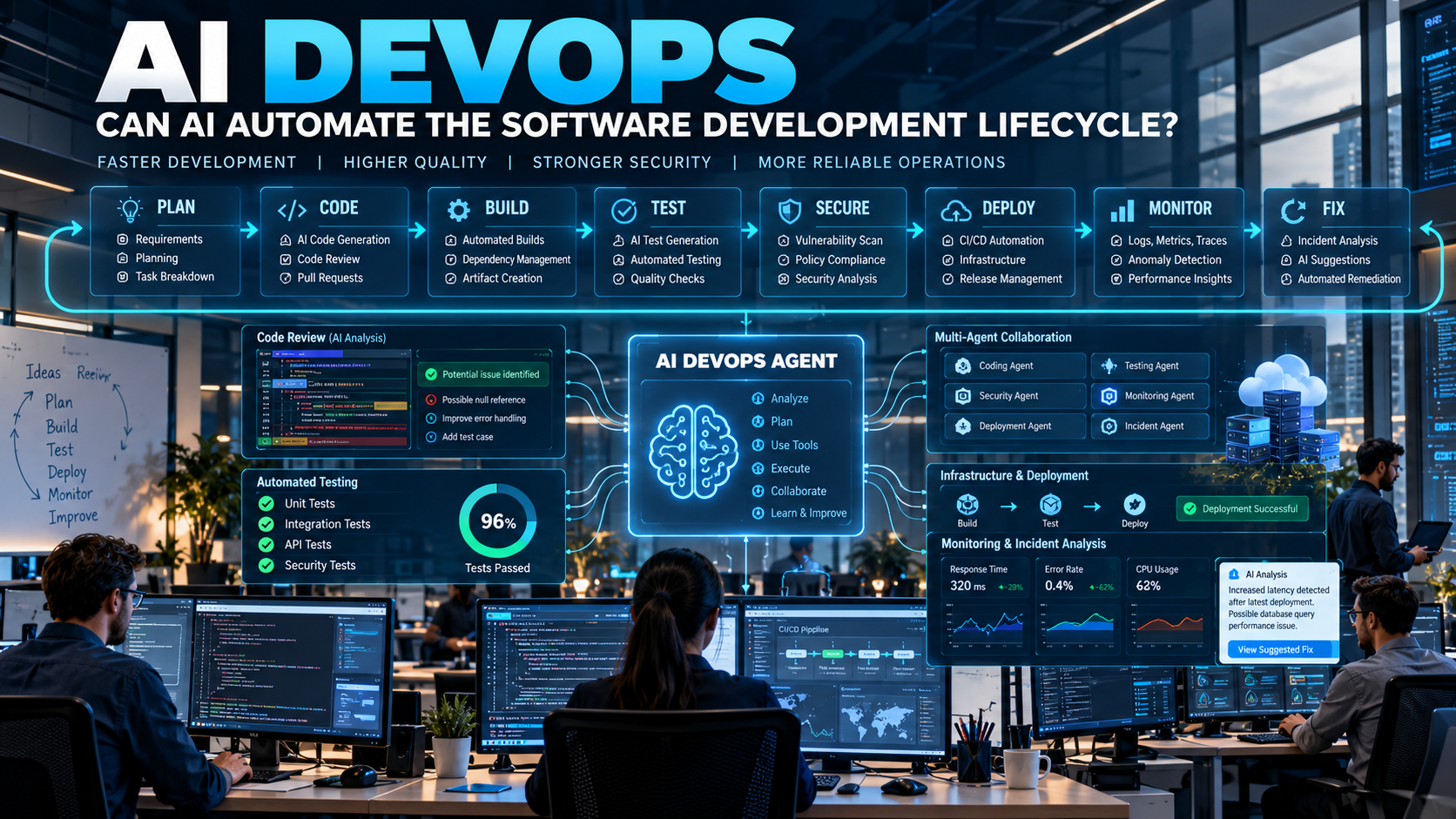
Software development is no longer just about writing code. Modern teams also need to test applications, manage cloud infrastructure, find security problems, deploy new versions and monitor applications after they go live.
DevOps has already helped automate many of these activities. Now, Artificial Intelligence is adding another layer of automation and intelligence.
This new approach is often called AI DevOps.
AI DevOps uses AI systems, automation tools and AI agents to help teams plan, build, test, secure, deploy and monitor software.
But how much of the software development lifecycle can AI actually automate?
What Is AI DevOps?
AI DevOps means using Artificial Intelligence throughout the DevOps lifecycle to automate repetitive tasks, analyze software data and assist with technical decisions.
Traditional DevOps uses predefined workflows.
For example:
Code pushed → Build starts → Tests run → Application is deployed
AI DevOps can make this workflow more intelligent.
For example:
Code pushed → AI analyzes changes → Relevant tests are selected → Security risks are checked → Build runs → AI monitors deployment → Problems are detected
The goal is not simply to add AI to existing tools. It is to use AI to make software delivery more automated, adaptive and intelligent.
What Is the Software Development Lifecycle?
The Software Development Lifecycle (SDLC) is the complete process of creating and maintaining software.
It usually includes activities such as:
- Planning
- Requirements
- Design
- Coding
- Building
- Testing
- Security
- Release
- Deployment
- Monitoring
- Maintenance
DevOps connects development and operations so these activities can happen continuously.
A typical DevOps lifecycle can be represented as:
Plan → Code → Build → Test → Release → Deploy → Operate → Monitor
The information collected during monitoring can then influence the next development cycle.
How Is AI Changing DevOps?
Traditional automation normally follows rules created by engineers.
For example:
“Whenever code is pushed to the repository, run the test pipeline.”
AI can add context to this process.
Instead of running every possible test, an AI system could analyze the code changes and help identify which areas are most relevant.
It could also analyze test failures, review logs and explain what may have caused a problem.
This changes the idea of DevOps from automation based only on predefined rules toward automation supported by AI-driven analysis and decisions.
Can AI Help With Software Planning?
AI can participate before coding even begins.
Developers and product teams can give an AI system a high-level requirement such as:
“Build a customer dashboard with authentication, search and reporting.”
AI can help break this requirement into smaller tasks.
It can potentially help create:
- User stories
- Technical requirements
- Development tasks
- API requirements
- Database requirements
- Testing requirements
- Security considerations
AI systems can also identify missing information and ask questions before development starts.
This can help teams discover problems earlier instead of finding them after coding has already started.
Can AI Write Software Code?
Yes.
AI coding tools can generate code from natural-language instructions and can also modify existing projects.
For example, a developer could ask:
“Add pagination to the users API.”
An AI coding agent could potentially:
- Inspect the existing project
- Find the relevant API files
- Understand the current implementation
- Modify the code
- Add or update tests
- Run the tests
- Report the results
Modern AI-driven development is increasingly moving toward agents that participate in multiple development steps instead of only generating individual code snippets.
However, developers still need to review important code changes.
AI-Powered Code Review
Code review is another area where AI can help.
AI can analyze a pull request and look for possible:
- Bugs
- Security issues
- Performance problems
- Duplicate code
- Poor coding patterns
- Missing tests
- Potential breaking changes
For example:
Developer creates pull request → AI reviews changes → AI identifies possible problems → Developer checks suggestions
AI can make code review faster, but its suggestions should still be validated.
Can AI Automate Software Testing?
Testing is one of the biggest opportunities for AI DevOps.
AI can help generate and analyze:
- Unit tests
- Integration tests
- API tests
- Regression tests
- Edge-case tests
- Performance tests
Suppose a developer changes an authentication system.
Instead of manually deciding every test that should run, AI can analyze the change and suggest relevant test cases.
The workflow could look like:
Code Change → AI Analysis → Test Generation → Test Execution → Result Analysis
This can help developers find problems earlier in the development process.
Can AI Find Bugs?
AI can analyze many types of software information to help identify possible bugs.
It can examine:
- Source code
- Error messages
- Test failures
- Application logs
- Recent deployments
- Performance metrics
For example:
API becomes slow → AI checks recent changes → AI analyzes logs → AI identifies suspicious behavior → AI suggests possible causes
The important point is that AI can help engineers investigate problems faster.
It does not mean every AI-generated diagnosis will be correct.
AI in CI/CD Pipelines
CI/CD stands for Continuous Integration and Continuous Delivery/Deployment.
A traditional CI/CD pipeline might look like:
Code Push → Build → Test → Security Scan → Deploy
AI can make parts of this pipeline more context-aware.
For example, AI could help determine:
- Which tests are relevant
- Whether a code change appears risky
- Whether additional security checks are needed
- Whether a deployment should be delayed
- Whether a failed pipeline is caused by code or infrastructure
This can make CI/CD pipelines more intelligent rather than simply executing the same sequence every time.
Can AI Automate Deployment?
AI can assist with software deployment, but production deployment needs strong controls.
AI can help:
- Prepare release plans
- Review deployment configurations
- Analyze deployment risks
- Monitor new releases
- Detect unusual behavior
- Recommend rollback
- Summarize deployment results
For example:
New version deployed → AI monitors application → Error rate increases → AI detects unusual behavior → Team receives an alert → Rollback can be recommended
For high-risk systems, organizations can require human approval before an AI agent performs production changes.
AI for Cloud Infrastructure
Modern applications often depend on cloud infrastructure, containers and orchestration systems.
AI can help engineers understand and manage:
- CPU usage
- Memory usage
- Network traffic
- Containers
- Cloud resources
- Infrastructure configurations
- Scaling requirements
AI can also help create or review Infrastructure as Code (IaC).
For example, a developer could ask:
“Create the infrastructure required to run this application with three production instances.”
AI could generate a proposed configuration.
The configuration can then be tested and reviewed before being applied.
AI-Powered Monitoring
Software does not stop requiring attention after deployment.
Applications continuously produce:
- Logs
- Metrics
- Traces
- Error reports
- Performance information
This information can become difficult for humans to analyze manually.
AI can help identify unusual patterns.
For example:
“The API response time increased by 40% after the latest release.”
AI can investigate related logs, metrics and recent changes to help engineers understand what happened.
This is one of the areas where AI can make observability more useful.
Can AI Handle Production Incidents?
Production incidents can require engineers to investigate many different systems.
For example:
Website becomes slow
An engineer may need to check:
- Recent deployments
- Server health
- Database performance
- API response times
- Network traffic
- Application logs
An AI DevOps system could help collect and analyze this information.
The workflow could become:
Alert → AI investigates → AI identifies possible cause → AI suggests solution → Human reviews → Action is taken
More advanced AI agents may eventually perform some low-risk remediation actions automatically, but production access should be controlled carefully.
What Are AI DevOps Agents?
An AI DevOps agent is an AI system that can perform multiple steps to complete a DevOps task.
A chatbot might answer:
“Your API is returning 500 errors.”
A DevOps agent could potentially investigate the issue.
For example:
- Check application logs
- Check recent deployments
- Inspect error messages
- Compare system metrics
- Identify a possible cause
- Suggest a fix
- Run tests
- Prepare a change for review
This is the difference between AI that provides information and AI that can perform a workflow using software tools.
Can AI Automate Security?
AI DevOps can also include security.
This is often connected with DevSecOps, where security is integrated throughout software development.
AI can help analyze:
- Vulnerabilities
- Dependencies
- Source code
- Infrastructure
- Secrets
- Security alerts
- Suspicious activity
For example:
Code change → Security scan → AI analyzes findings → Risks are prioritized → Developer reviews the results
This can help teams focus on the security problems that matter most.
But AI security tools can also produce incorrect findings, so human validation remains important.
Can AI Automatically Fix Software Problems?
In some situations, AI can generate possible fixes.
For example:
Bug detected → AI investigates → AI proposes code change → Tests run → Results are checked
If the tests pass, the change can be submitted for developer review.
For low-risk tasks, organizations may eventually automate more of this process.
For critical applications, however, an approval step can remain necessary.
The goal should not be:
“Let AI change everything.”
Instead:
“Let AI handle repetitive work while humans control important decisions.”
What Is AI-Driven DevOps?
AI-driven DevOps goes beyond using one AI tool for coding.
It connects AI capabilities across multiple stages.
A simplified workflow could look like:
Plan
↓
AI helps understand requirements
Code
↓
AI assists with development
Test
↓
AI generates and analyzes tests
Secure
↓
AI identifies potential security problems
Deploy
↓
AI assists with release and deployment
Monitor
↓
AI analyzes application behavior
Improve
↓
AI uses production feedback to help with the next development cycle
This creates a more continuous software development process.
AI DevOps vs Traditional DevOps
| Traditional DevOps | AI DevOps |
|---|---|
| Rule-based automation | AI-assisted automation |
| Predefined workflows | More context-aware workflows |
| Manual log investigation | AI-assisted log analysis |
| Manual test creation | AI-assisted test generation |
| Manual troubleshooting | AI-assisted troubleshooting |
| Fixed monitoring rules | AI-assisted anomaly detection |
| Human-written infrastructure | AI-assisted infrastructure configuration |
| Manual incident analysis | AI-assisted incident investigation |
AI DevOps does not replace traditional DevOps.
Instead, AI can work on top of existing automation to make some workflows more intelligent.
What Are the Benefits of AI DevOps?
Faster Development
AI can automate repetitive development activities and help developers complete tasks faster.
Faster Testing
AI can help generate and analyze large numbers of test cases.
Faster Troubleshooting
AI can analyze logs, errors and metrics much faster than manually searching through large amounts of data.
Better Developer Productivity
Developers can spend more time on architecture, product decisions and complex engineering problems.
Faster Software Releases
More automation can reduce delays between development and deployment.
Better Monitoring
AI can continuously analyze application behavior and identify unusual patterns.
Less Repetitive Work
Routine tasks can increasingly be handled by automation and AI agents.
SDLC automation is specifically aimed at reducing repetitive, error-prone work while integrating development, operations, security and governance into automated workflows.
What Are the Risks of AI DevOps?
AI DevOps also creates new challenges.
Incorrect AI Decisions
AI may misunderstand code, infrastructure or production data.
Security Risks
Giving an AI agent access to production systems introduces additional security concerns.
AI-Generated Bugs
AI-generated code can still contain bugs and vulnerabilities.
Too Much Automation
An incorrect automated action could cause a production outage.
Lack of Transparency
Teams need to know what an AI agent changed and why.
Cost
Running AI agents and models can increase computing costs.
Governance
Organizations need clear rules about what AI can access and what actions it can perform.
Should AI Have Full Access to Production?
Usually, AI should not automatically receive unrestricted production access.
A safer approach is to use different permission levels.
Low-Risk Actions
AI can:
- Read logs
- Analyze code
- Generate reports
- Create tests
- Suggest fixes
Medium-Risk Actions
AI can:
- Create pull requests
- Modify development environments
- Run tests
- Prepare infrastructure changes
High-Risk Actions
AI could potentially:
- Deploy to production
- Change databases
- Modify production infrastructure
- Roll back services
These high-impact actions can require stronger approval and policy controls.
The basic principle is:
More AI autonomy should require stronger testing, permissions and monitoring.
AI-agent lifecycle guidance also emphasizes access controls, testing, controlled deployment, monitoring and human oversight because agents can use tools and perform multi-step actions.
What Does the Future of AI DevOps Look Like?
The future may move from individual AI tools toward agentic DevOps.
Instead of one AI assistant, different AI agents could specialize in different tasks.
For example:
Coding Agent
Writes and modifies code.
↓
Testing Agent
Creates and runs tests.
↓
Security Agent
Checks vulnerabilities.
↓
Deployment Agent
Prepares and manages releases.
↓
Monitoring Agent
Watches production systems.
↓
Incident Agent
Investigates problems.
An orchestration layer could coordinate these agents.
This is part of a broader shift toward AI agents participating across the entire software development lifecycle.
Will AI Replace DevOps Engineers?
AI is more likely to change the role of DevOps engineers than simply remove it.
DevOps engineers may spend less time performing repetitive manual tasks and more time working on:
- System architecture
- Reliability
- Security
- Infrastructure strategy
- Automation design
- Governance
- AI agent supervision
- Production decision-making
The role could gradually move from:
“Perform every operational task manually”
to:
“Design, supervise and control intelligent automation.”
Human engineers will remain important because software systems involve business requirements, security decisions, unexpected failures and situations where AI may not have enough context.
From DevOps to Agentic DevOps
DevOps already introduced automation into software development and operations.
AI adds intelligence to that automation.
Agentic DevOps could add autonomous multi-step execution.
The evolution can be explained as:
Manual Operations
↓
DevOps Automation
↓
AI-Assisted DevOps
↓
Agentic DevOps
↓
More Autonomous Software Operations
The final stage does not necessarily mean humans disappear.
Instead, humans can define the goals, permissions, policies and safety boundaries, while AI handles more of the execution.
Conclusion: Can AI Automate the Software Development Lifecycle?
AI can automate and assist with many parts of the software development lifecycle.
It can help with planning, coding, testing, security, CI/CD, infrastructure, deployment, monitoring and incident investigation.
The biggest change is that AI is moving from being a simple coding assistant toward becoming an active participant in software workflows. Current SDLC research describes this shift toward AI agents working across multiple stages of development and operations.
But AI DevOps does not mean giving an AI unlimited control over production systems.
A more practical model is:
AI handles repetitive work → Automation executes defined workflows → Policies control risky actions → Humans approve important decisions.
The future of DevOps may therefore not be AI replacing DevOps.
It may be AI making DevOps faster, more intelligent, more automated and more proactive.
