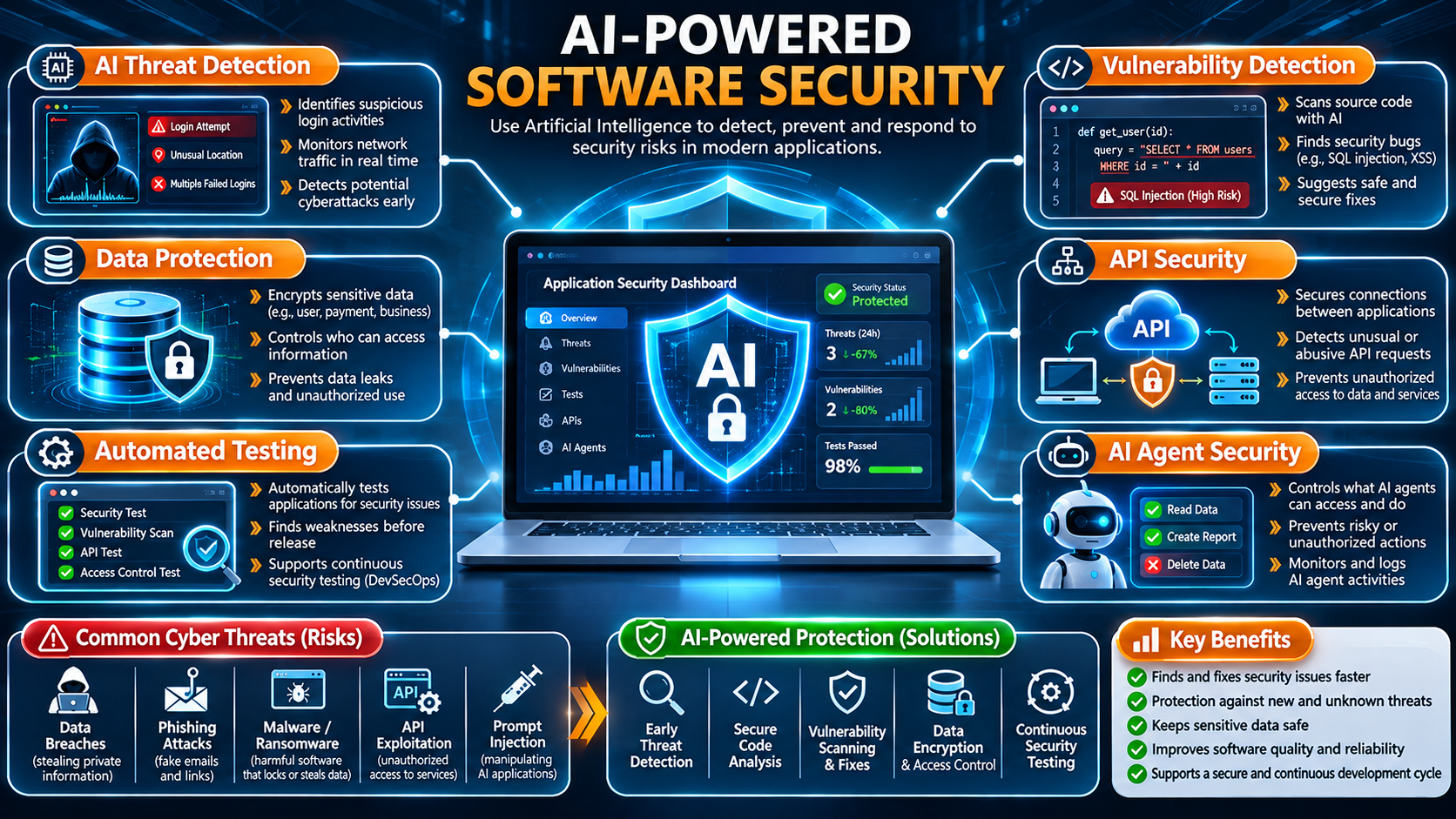
Today, software is used almost everywhere. We use mobile applications for banking, websites for shopping, and business software for managing company operations.
But as technology grows, the risks of cyberattacks also increase.
Hackers constantly look for weaknesses in applications to steal personal information, access private accounts or damage business systems.
Traditional security tools are useful, but modern cyberattacks are becoming more difficult to identify. This is where Artificial Intelligence (AI) is making a difference.
AI can help developers find security problems, detect unusual activities and protect applications from potential threats.
However, AI is not only helping security teams. Cybercriminals can also use AI to create smarter attacks.
This creates a new challenge for software developers and businesses: How can we use AI to build applications that are safer and more secure?
Let’s understand how AI-powered software security works and why it is becoming important in modern software development.
Category 1: Understanding AI-Powered Software Security
1. What Is AI-Powered Software Security?
AI-powered software security means using artificial intelligence to help protect applications, websites, databases and computer systems from cyberattacks.
Traditional security systems often follow predefined rules to identify known threats.
For example, a security system may block an IP address that has already been identified as dangerous.
AI-powered security tools can also study user behavior and identify unusual activities that may indicate a new security problem.
Imagine someone normally logs into their account from Ahmedabad. Suddenly, another person tries to access the same account from a different country using unusual login activity.
An AI-powered security system can recognize this unusual behavior and alert the security team.
In simple words, AI helps security systems understand what normal activity looks like and identify activities that appear suspicious.
2. Why Do Modern Applications Need AI Security?
Modern applications are more complex than ever.
A single business application may contain login systems, payment gateways, APIs, databases, customer information and cloud services.
Every connected component needs proper security.
Checking all these components manually can take a lot of time.
AI can help developers analyze application data, review code and identify possible security problems more efficiently.
For example, an AI security tool can detect repeated failed login attempts and notify the administrator about a possible account attack.
This helps developers and security teams identify problems earlier.
Category 2: Common Security Threats Facing Applications
3. Data Breaches: Protecting Private Information
A data breach happens when someone accesses information without permission.
For example, imagine an online shopping website that stores customer names, phone numbers, email addresses and order details.
If a hacker gains access to its database, this information could be stolen or misused.
Data breaches can happen because of weak passwords, poor database security, incorrect permissions or software vulnerabilities.
AI-powered security tools can help monitor database activity and identify unusual access patterns.
However, businesses must also use encryption, secure authentication and proper access permissions to protect customer information.
4. Phishing Attacks: Fake Messages That Steal Information
Phishing is a type of cyberattack in which criminals send fake emails, messages or website links to trick people into sharing private information.
For example, you may receive a message that looks like it comes from your bank.
It may ask you to click a link and verify your account details.
But the link opens a fake website designed to steal your password.
AI has made it easier for attackers to create professional-looking messages with convincing language.
At the same time, AI security tools can help identify suspicious emails, links and unusual communication patterns.
Users should always check website addresses and avoid clicking unknown links.
5. Malware and Ransomware: Attacks That Can Damage Systems
Malware is harmful software designed to damage computers, steal information or access systems without permission.
Ransomware is a type of malware that can lock or encrypt important files and demand money to restore access.
For example, an employee may accidentally download an infected file from an unknown website.
That file could introduce malware into the company’s computer system.
AI-powered security tools can analyze suspicious files and unusual computer activities to help identify potential threats.
They can also help security teams respond to security incidents more quickly.
6. API Security: Protecting Connections Between Applications
An API, or Application Programming Interface, allows two different software applications to communicate with each other.
For example, an e-commerce website may use APIs to connect with a payment gateway, delivery service or customer management system.
If an API does not have proper security, attackers may try to access information or perform actions without permission.
Common API security problems include weak authentication, incorrect permissions and poor input validation.
AI-powered monitoring tools can help identify unusual API requests and suspicious usage patterns.
However, developers must also use proper authentication, authorization and request validation.
Category 3: How AI Helps Protect Software Applications
7. AI-Powered Vulnerability Detection
A software vulnerability is a weakness in an application that attackers may use to gain unauthorized access or damage a system.
For example, a developer may write an unsafe database query that allows an attacker to access information they should not see.
AI-powered code analysis tools can review source code and identify potentially unsafe programming patterns.
They can help detect issues such as:
- SQL injection risks.
- Weak authentication systems.
- Hardcoded passwords or API keys.
- Incorrect user permissions.
- Unsafe input handling.
- Vulnerable software libraries.
Imagine a developer writing a login system.
An AI security tool may identify that the database query directly uses information entered by the user without proper protection.
The tool can suggest using parameterized queries to reduce the risk of SQL injection.
This helps developers identify security problems before an application goes live.
However, developers must review and test AI suggestions because AI tools can sometimes miss problems or generate incorrect results.
8. Real-Time Threat Detection
Real-time threat detection means monitoring application activities and identifying suspicious behavior as it happens.
For example, imagine an employee normally accesses a few customer records every day.
Suddenly, the same account starts downloading thousands of records within a few minutes.
An AI-powered monitoring system may identify this unusual activity and send an alert to the security team.
The team can then investigate whether the activity is legitimate or a possible security attack.
This helps organizations identify unusual behavior earlier and respond more effectively.
9. Automated Security Testing
Before launching a website or application, developers need to check whether it is safe to use.
This process is called security testing.
Manual testing is important, but checking every feature of a large application can take considerable time.
AI can help developers create test cases, review application behavior and identify possible security weaknesses.
For example, AI-assisted testing can help check:
- Login and registration systems.
- Password reset functionality.
- User access permissions.
- API security.
- Form input validation.
- Database interactions.
AI can also help explain test results and suggest areas that need further investigation.
However, automated testing should always be combined with proper security reviews and professional testing.
10. Intelligent Fraud Detection
Online shopping websites, banking applications and payment platforms process thousands of transactions.
Some attackers try to use stolen accounts or suspicious payment methods to commit fraud.
AI-powered fraud detection systems can study transaction patterns and identify activities that look unusual.
For example, if an account suddenly makes multiple unusual purchases within a short period, the system may flag those transactions for additional verification.
This helps businesses identify possible fraud and protect their customers.
Category 4: New Security Risks Created by AI
AI is helping developers protect software, but it is also creating new security challenges.
11. Prompt Injection: Manipulating AI Applications
Prompt injection is an attack in which someone uses specially designed instructions to manipulate an AI system into behaving in an unintended way.
For example, imagine a customer support chatbot connected to a company’s internal documents.
An attacker may send a message designed to make the chatbot ignore its normal instructions and reveal information that should remain private.
If the application does not properly control what information the AI can access, sensitive data could be exposed.
Developers should treat user inputs and external documents as untrusted information.
They should also apply permission controls and carefully check what actions an AI system is allowed to perform.
12. AI Data Leakage: Keeping Business Information Private
Many AI applications work with customer information, business documents and internal company data.
If an AI application does not have proper security, private information may accidentally appear in responses or become accessible to unauthorized users.
For example, imagine an AI assistant connected to a company’s ERP system.
If employee permissions are not correctly configured, one employee may receive confidential information belonging to another department.
To reduce this risk, developers should:
- Limit access to sensitive information.
- Use proper authentication.
- Apply role-based permissions.
- Protect stored data with encryption.
- Monitor AI requests and responses.
- Avoid sharing unnecessary confidential information with external AI services.
Protecting information is especially important when AI is connected to business applications.
13. AI-Generated Code: Is It Always Secure?
AI coding tools can help developers write code, fix errors and create application features.
They can save time, but AI-generated code is not automatically secure.
For example, an AI tool may create a login system that works correctly but does not properly protect user sessions or passwords.
The application may look functional while still having security weaknesses.
This is why developers should never copy AI-generated code directly into a live application without checking it.
Important practices include reviewing code, testing security, checking third-party libraries and validating user input.
AI should be treated as a development assistant, not a replacement for secure programming knowledge.
14. AI Agents: Why Permissions Matter
Modern AI agents can do more than answer questions.
Depending on their configuration, they can access files, call APIs, execute commands and interact with other applications.
For example, a company may connect an AI agent to its business management software to help employees retrieve reports or update records.
But what happens if the AI agent has access to every company record?
An incorrect instruction or manipulated input could cause the agent to access private information or perform an unwanted action.
Developers should give AI agents only the permissions they actually need.
Important actions, such as deleting records, transferring money or changing important account settings, should require additional authorization.
Category 5: Best Practices for Building Secure Software
15. Use Strong Authentication and Authorization
Authentication checks who is trying to access an application.
Authorization decides what that person is allowed to do.
For example, in a business management system:
- An administrator can manage users.
- A manager can view department reports.
- An employee can access assigned records.
Developers should implement strong passwords, secure login systems and multi-factor authentication where appropriate.
They should also apply role-based access control.
Remember that hiding a button from a user is not enough. The server must also check whether the user has permission to perform that action.
16. Protect Sensitive Data with Encryption
Encryption is a method of protecting information by converting readable data into a protected format.
For example, when you visit a website using HTTPS, information exchanged between your browser and the website is protected during transmission.
Applications should also protect sensitive information stored in databases.
Passwords should never be stored as plain text. Developers should use secure password-hashing methods.
Proper encryption and key management help reduce the risk of exposing private information.
17. Keep Software and Libraries Updated
Modern applications use different frameworks, libraries and external packages.
These tools help developers build applications faster, but outdated versions may contain security weaknesses.
For example, a website may use an old JavaScript package that contains a known vulnerability.
If developers do not update it, attackers may try to exploit that weakness.
To reduce security risks, developers should regularly update software, check dependencies, remove unnecessary packages and monitor security announcements.
Keeping software updated is one of the simplest ways to improve application security.
18. Follow Secure Software Development Practices
Security should not be added only after an application is completed.
It should be considered during every stage of development.
A secure software development process includes six important stages:
1. Planning: Identify possible security risks before starting development.
2. Design: Create an application structure with proper security controls.
3. Development: Write code using secure programming practices.
4. Testing: Check the application for vulnerabilities and security problems.
5. Deployment: Configure servers, databases and user permissions securely.
6. Maintenance: Monitor the application, update software and fix newly discovered issues.
This approach is closely related to DevSecOps, which integrates security into the software development process.
Category 6: The Future of AI-Powered Software Security
19. What Will Software Security Look Like in the Future?
As AI becomes more powerful, software security will continue to change.
Developers will increasingly use AI tools to review code, monitor applications and identify potential security problems.
Some important developments include:
AI Security Agents
AI agents may help investigate suspicious activities, analyze security problems and suggest possible solutions.
Smarter Code Reviews
AI-powered development tools will help developers identify unsafe code while they are writing applications.
Continuous Security Monitoring
Applications will be monitored continuously to identify suspicious activities and possible security threats.
AI Application Security Testing
Developers will need new testing methods to check how AI applications handle private information, external instructions and connected tools.
Better AI Governance
Companies will need clear rules about how AI systems access company data and interact with important business applications.
These developments will make security an even more important part of modern software engineering.
Conclusion: Building a Safer Digital Future with AI
Artificial Intelligence is changing how developers build, test and protect software applications.
It can help identify vulnerabilities, detect suspicious activities, improve security testing and protect important information.
However, AI also introduces new risks, including prompt injection, data leakage, insecure AI-generated code and excessive permissions for AI agents.
This means businesses cannot depend on AI alone to protect their applications.
Strong authentication, secure coding, encryption, regular updates and proper access control are still essential.
The best approach is to combine AI-powered security tools with experienced developers and cybersecurity professionals.
The future of software development is not just about building applications faster. It is about building applications that are secure, reliable and ready for an increasingly connected digital world.
