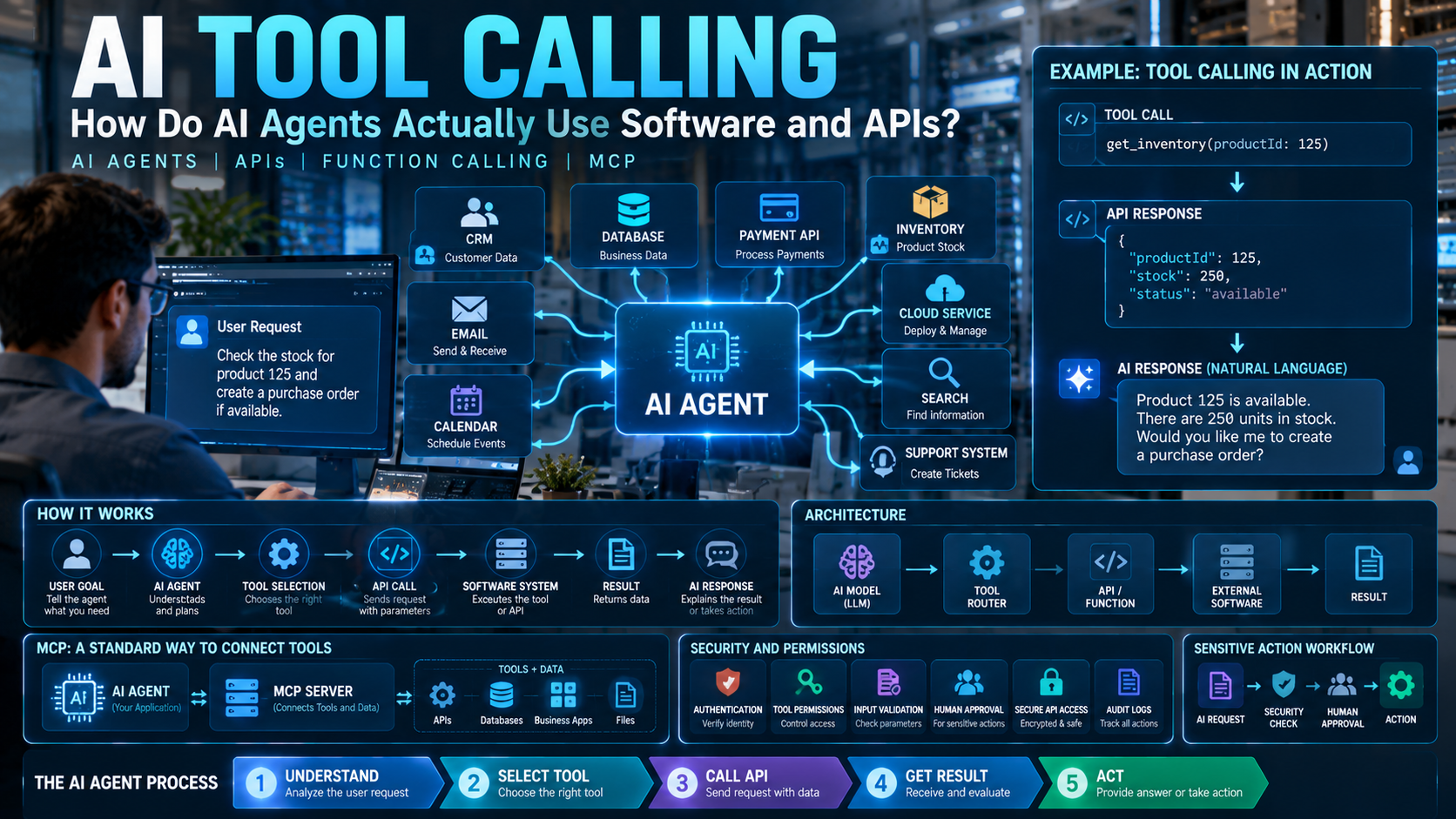
AI can already understand questions, write content, summarize information and generate code. But modern AI agents are becoming capable of doing much more than generating text.
An AI agent can search for information, check a database, use an API, update software, create a support ticket or perform other digital tasks.
But how does an AI model actually use another software application?
The answer is AI tool calling.
Tool calling gives an AI model access to external functions, APIs and other software tools. This allows an AI agent to move from simply answering questions to performing tasks.
What Is AI Tool Calling?
AI tool calling is a technology that allows an AI model to request the use of an external tool when it needs information or needs to perform an action.
For example, imagine you ask an AI agent:
“Check my order and tell me when it will arrive.”
The AI model may not have access to your order information.
Instead, it can use a tool such as:
get_order_status
That tool can connect to the company’s order system and return the latest information.
The basic process is:
User → AI Agent → Tool/API → Result → AI Agent → User
Why Do AI Agents Need Tools?
An AI model does not automatically have access to every application or database.
For example, an AI model may not know:
- Your current inventory
- Your latest order status
- Your company’s customer records
- Your calendar appointments
- Your private database information
- The current status of a support ticket
Tools give the AI a controlled way to access this information.
This makes AI agents much more useful because they can work with real software and real data, instead of relying only on the information already available to the model.
How Does AI Tool Calling Work?
AI tool calling usually follows a simple multi-step process.
Step 1: The User Gives a Request
The user tells the AI what they want.
For example:
“How many products are currently in stock?”
Step 2: The AI Understands the Request
The AI determines what information is needed.
It may realize that it cannot answer the question without accessing an inventory system.
Step 3: The AI Selects a Tool
The application provides the AI with available tools.
For example:
check_inventory
The AI can decide that this tool is appropriate.
Step 4: The AI Provides the Required Information
The AI generates the inputs needed by the tool.
For example:
productId: 125
Step 5: The Application Executes the Tool
The application or server receives the request and runs the actual function or API.
Step 6: The Tool Returns a Result
The inventory system might return:
Product 125: 250 units available
Step 7: The AI Gives the Final Answer
The AI receives the result and explains it to the user:
“There are currently 250 units available.”
This is the basic tool-calling loop described in modern AI APIs.
Does the AI Directly Call the API?
Usually, the AI model does not directly control your backend API.
Instead, the AI requests a tool call, and the application or tool server performs the actual operation.
For example:
AI Model
↓
get_customer(customerId: 125)
↓
Your Application
↓
GET /api/customers/125
↓
Backend API
↓
Customer information
↓
AI Model
↓
Final response
This separation is important because developers can control authentication, validation, permissions and business rules before an action is performed.
What Is an AI Tool?
An AI tool is simply a capability that an AI agent is allowed to use.
A tool could be almost any software function.
For example:
get_weather()search_products()check_inventory()get_customer()send_email()create_invoice()create_ticket()search_database()schedule_meeting()
The AI does not necessarily need to understand how the function is implemented.
It needs to understand:
What does this tool do?
What information does it need?
What result does it return?
How Does an AI Know Which Tool to Use?
Developers provide the AI with descriptions of available tools.
For example:
Tool: check_inventory
Description:
Returns the current stock quantity for a product.
Input:
productId
If the user asks:
“Is product 501 available?”
The AI can recognize that check_inventory is relevant.
It can then request:
check_inventory(productId: 501)
The application executes the function and sends the result back to the AI.
Modern function-calling systems commonly describe tool inputs using structured schemas so the model can produce the required arguments.
What Is Function Calling?
You may also hear the term function calling.
Function calling is closely related to tool calling.
A developer can define a function that an AI model is allowed to request.
For example:
get_weather(location)
The AI might request:
get_weather("Ahmedabad")
The application then runs the actual function and returns the weather information.
In simple terms:
Function Calling = AI requests a specific function
Tool Calling = AI uses an external capability
The exact terminology can vary between AI platforms, but the basic idea is similar.
Can AI Agents Use APIs?
Yes.
APIs are one of the most important ways AI agents can interact with existing software.
For example, an AI travel agent could potentially connect to:
- Flight APIs
- Hotel APIs
- Maps APIs
- Calendar APIs
- Payment APIs
- Travel databases
The AI understands the user’s request and can coordinate the required services.
For example:
“Find a hotel near the airport for two nights and add the booking to my calendar.”
The agent could potentially:
Search hotels → Check availability → Select a hotel → Create booking → Update calendar
The exact actions depend on which tools and permissions the application provides.
Can AI Agents Use Multiple Tools?
Yes.
This is one of the most powerful parts of tool calling.
Imagine a customer says:
“Find a laptop under ₹70,000, check if it is available and tell me when it can be delivered.”
The AI agent may need several tools:
Search Products
↓
Check Price
↓
Check Inventory
↓
Check Delivery
↓
Final Answer
Some tools can be used independently, while others need the result of a previous tool call.
This allows an AI agent to create a multi-step workflow instead of performing only one operation.
A Simple Real-World Example
Imagine an online store has four APIs:
search_products()
check_inventory()
create_order()
get_shipping_status()
A customer says:
“Find a black laptop under ₹70,000 and order it if it is available.”
The AI agent could work like this:
1. Search products
search_products(color="black", maxPrice=70000)
2. Check inventory
check_inventory(productId=123)
3. Create order
If the product is available:
create_order(productId=123)
4. Respond to the customer
“The laptop was available and your order has been created.”
The important part is that the AI is coordinating software tools rather than doing everything itself.
What Is the Difference Between a Chatbot and an AI Agent?
A traditional chatbot might work like this:
User → Question → AI → Answer
An AI agent can work more like this:
User → Goal → AI → Tool → Result → Another Tool → Final Result
For example, a chatbot might tell you:
“You can check your order status from the order page.”
An AI agent with the right permission could potentially check the order itself and tell you:
“Your order has shipped and is expected to arrive tomorrow.”
That ability to interact with external systems is one of the important differences between basic AI chat and agentic software.
Can AI Agents Take Real Actions?
Yes, if developers provide tools that have permission to perform actions.
For example, an AI agent could potentially:
- Create a support ticket
- Schedule a meeting
- Update a CRM record
- Generate an invoice
- Send an email
- Search a database
- Update a project
- Place an order
But there is an important difference between reading information and changing something.
A tool that only reads data is generally lower risk than a tool that can delete records, transfer money or make other sensitive changes.
Why Are Permissions Important?
Imagine an AI agent has access to these tools:
read_customer()
update_customer()
delete_customer()
make_payment()
Giving the agent unlimited access would create unnecessary risk.
A better system can control what the agent is allowed to do.
For example:
Read Customer → Allowed
Create Support Ticket → Allowed
Update Customer → Allowed With Rules
Delete Customer → Human Approval
Make Payment → Additional Authorization
Tool access should therefore be designed around the minimum permissions required for the task.
What Are Tool Permissions?
Tool permissions define what an AI agent can and cannot do.
A system might have different levels of access:
Read Access
The AI can view information.
Write Access
The AI can modify information.
Execute Access
The AI can perform an operation.
Administrative Access
The AI can perform sensitive system operations.
The more powerful the tool, the more carefully its access should be controlled.
Can Humans Approve AI Actions?
Yes.
For sensitive operations, developers can add a human approval step.
For example:
AI Agent → Prepare Payment → Human Approval → Payment API
Another example:
AI Agent → Draft Email → Human Review → Send Email
This is called a human-in-the-loop workflow.
For low-risk actions, automatic execution may be acceptable.
For high-risk actions, human approval can provide an additional layer of control.
What Happens When a Tool Fails?
Tools do not always work successfully.
An API might be unavailable.
A database might return an error.
A product might not exist.
A required parameter might be missing.
For example:
check_inventory(productId=999)
could return:
Product not found
The AI agent can then decide what to do next.
It might:
- Ask the user for more information
- Try another tool
- Try another product
- Explain the problem
- Stop the workflow
Good error handling is therefore an important part of building reliable AI agents.
Can AI Agents Use Tools Multiple Times?
Yes.
An AI agent may need to call several tools during one task.
For example:
User Request
↓
Search API
↓
Result
↓
Database
↓
Result
↓
Calendar API
↓
Result
↓
Final Answer
The agent can continue this process until it has enough information to complete the task.
This repeated process is often called an agent loop.
Modern agent systems can continue a tool-calling flow through multiple tool calls when a task requires it.
What Is MCP?
MCP stands for Model Context Protocol.
It is an open protocol designed to connect AI applications and agents with external tools and data.
Instead of creating completely different integration methods for every AI application and every external service, MCP provides a standardized way for tools and data to be exposed to AI systems.
A simplified example is:
AI Agent → MCP Server → External Tool/Data
An MCP server can expose tools that the AI agent can discover and use.
How Does MCP Tool Calling Work?
The basic process can look like this:
AI Agent
↓
MCP Server
↓
Tool
↓
External System
↓
Result
↓
AI Agent
For example:
AI Agent → MCP → CRM Tool → Customer Database
The server can provide the tool description, accept the request, validate it, perform the operation and return the result.
This creates a common connection layer between AI systems and external software.
Why Is MCP Important?
Without a common protocol, developers may need to build many separate integrations.
For example:
AI Application → Custom CRM Integration
AI Application → Custom Database Integration
AI Application → Custom Project Tool Integration
MCP provides a common approach for exposing tools and data to AI applications.
As AI agents connect to more software, standard protocols can make those connections easier to manage.
MCP is now supported as a tool-connection option in modern agent platforms.
What Software Can AI Agents Use?
AI agents can potentially connect to many types of software.
Business Software
CRM, ERP, accounting and HR systems.
Developer Software
Git repositories, issue trackers, CI/CD platforms and databases.
Communication Software
Email, messaging and collaboration tools.
Productivity Software
Calendars, documents and project-management systems.
Data Systems
SQL databases, search engines and analytics platforms.
Cloud Systems
Cloud APIs, monitoring platforms and deployment systems.
The important requirement is that the software must provide a secure and authorized way for the agent to interact with it.
Can AI Tool Calling Help Businesses?
Yes.
One major advantage is that companies can connect AI to their existing software instead of replacing everything.
For example:
Employee → AI Agent → CRM + ERP + Database + Email
An employee could ask:
“Show me this month’s sales and create a report.”
The agent could potentially:
- Query the sales database.
- Analyze the information.
- Generate a report.
- Save the report.
- Send it to the required team.
The exact workflow depends on the tools, permissions and business rules configured by the company.
What Are the Biggest Risks of AI Tool Calling?
Giving AI access to software also creates security risks.
An AI agent with powerful tools can potentially cause more damage than a chatbot if those tools are poorly designed or given excessive permissions.
Important risks include:
- Unauthorized actions
- Excessive permissions
- Sensitive data exposure
- Prompt injection
- Incorrect tool selection
- Malicious tool inputs
- API abuse
- Accidental data modification
- Insecure integrations
- Poor authentication
This is why AI tool calling needs strong security controls.
Why Should Developers Validate AI Tool Inputs?
AI-generated tool arguments should not automatically be trusted.
Imagine an AI generates:
make_payment(amount=1000000)
The backend should not simply execute this request.
It should first check:
- Who is making the request?
- Is the user authorized?
- Is the amount allowed?
- Is the account valid?
- Does the transaction follow business rules?
- Is additional approval required?
The AI can request an action, but the backend should decide whether that action is actually allowed.
Why Is Authentication Important?
When an AI agent accesses private software, it needs proper authentication.
For example, an agent connecting to a private CRM should not simply receive unlimited access to every customer record.
The system should identify:
Who is the user?
What is the user allowed to access?
What is the AI agent allowed to do?
Which tool can perform the requested action?
Modern MCP integrations also support authorization mechanisms for tools that access private data or perform user actions.
AI Tool Calling vs Traditional Automation
Traditional automation usually follows a fixed workflow:
Step 1 → Step 2 → Step 3 → Step 4
AI agents can make the workflow more flexible:
Goal → Understand → Choose Tool → Execute → Evaluate → Choose Next Tool
Traditional automation can still be very useful when the process is predictable.
AI agents become particularly useful when a task requires understanding natural language, selecting between different tools or adapting based on results.
Can AI Tool Calling Make Software Smarter?
Yes.
Tool calling allows an AI application to become a bridge between users and existing software.
Instead of asking users to manually open several applications, an AI agent can potentially coordinate multiple systems.
For example:
User
↓
“Find the customer’s latest order and create a support ticket if it is delayed.”
The agent could potentially:
CRM → Order API → Delivery API → Support System
The user interacts with one AI interface while the agent works with several systems behind the scenes.
What Will AI Tool Calling Look Like in the Future?
AI agents are increasingly moving from simple question-answering toward multi-step workflows.
Future applications may connect:
AI Models + APIs + Databases + Business Software + Cloud Services + Human Approval
Tool discovery may also become more dynamic. Instead of loading every possible tool into the model at once, systems can discover or load relevant tools when needed. Current AI platforms are already introducing tool-search and other approaches for handling larger tool collections.
What Is the Future of AI Agents and APIs?
The future could move from applications where humans manually operate every software system to applications where AI agents coordinate many systems on behalf of users.
Imagine asking:
“Prepare this month’s sales report, find customers with delayed orders and create follow-up tasks for the sales team.”
Instead of manually opening several applications, an AI agent could potentially coordinate:
Database → CRM → Order System → Analytics → Task Management
The important part is that the AI does not replace these systems.
It connects and coordinates them.
So, How Do AI Agents Actually Use Software and APIs?
The complete process can be summarized simply:
1. User gives the AI a goal.
↓
2. AI understands what needs to be done.
↓
3. AI chooses an appropriate tool.
↓
4. AI generates the required inputs.
↓
5. Application or tool server executes the request.
↓
6. The tool returns the result.
↓
7. AI evaluates the result.
↓
8. AI calls another tool if necessary.
↓
9. AI provides the final response or completes the action.
This simple loop is one of the foundations of modern AI agents.
Conclusion: Why Is AI Tool Calling Important?
AI tool calling is changing how software applications use artificial intelligence.
Instead of only generating text, AI agents can interact with APIs, databases, search systems, business applications and other software tools.
Function calling provides a way for models to request application-defined functions, while protocols such as MCP provide a standardized way to connect agents with external tools and data.
The future of AI software may therefore look less like:
User → App → Button → Result
and more like:
User → AI Agent → Tools → APIs → Software → Result
The biggest change is not simply that AI can generate better answers.
It is that AI can increasingly use software to turn those answers into actions.
That is what makes tool calling one of the most important building blocks behind modern AI agents.
